Why the Marketplace? Your appraisal becomes a ready-to-sell landing page
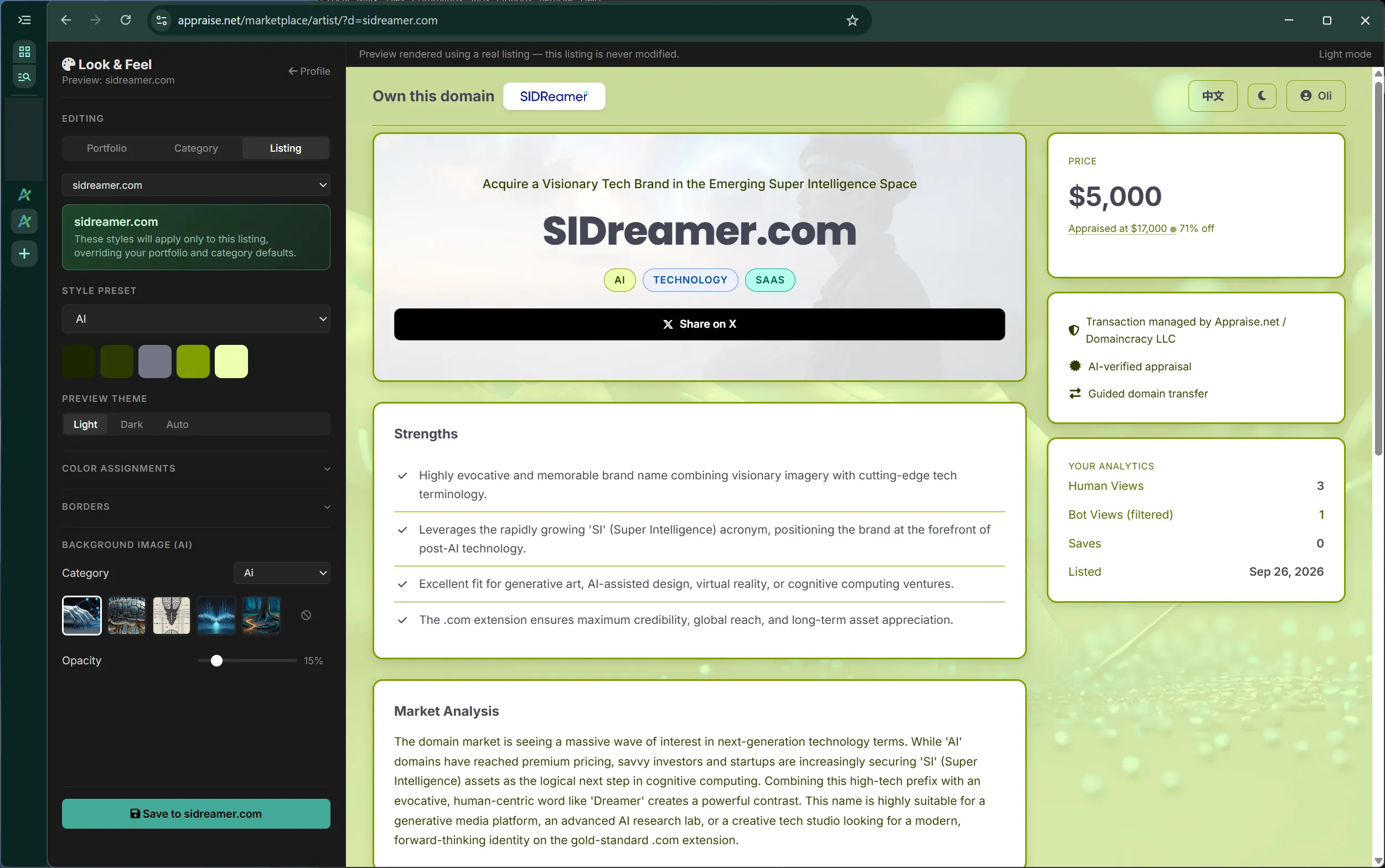
Every appraisal you run on Appraise.net does more than return a value. It builds a complete, standalone sales landing page for your domain, ready to publish to our Marketplace.
When our appraisal engine studies a domain, it produces the same building blocks a professional sales page needs. We turn those results directly into a listing, so there is no blank page to fill in.
What the appraisal turns into a listing
A substantive listing title that reads like a real headline, not just the domain spelled out
Domain categories that place the name in the right market
A written description that explains what the domain is and who it suits
A list of strengths drawn from the appraisal analysis
The result is a page a buyer can land on, read, and act on. It stands on its own, so you can share the link anywhere.
Two ways buyers find your domain
A published listing works through two channels at once, and they reinforce each other:
Direct type-in traffic: when your listing uses the standalone For-Sale Page, a buyer who types your exact domain into their browser lands directly on a focused, zero-distraction sales page with a clear call to action. This is the highest-intent visitor you can get; they already know the name they want.
Marketplace discovery: your listing is also found by buyers browsing our Marketplace. These buyers do not have one specific domain in mind, so our filters for category, price, and tone guide them to the right names. This puts your domain in front of an audience that would never have typed it in.
Both channels have value and work together. To learn how to turn on the standalone For-Sale Page for direct traffic, see How to become a seller.
Keep more of your sale
Our pricing is simple and seller-friendly: keep 96% of your sale, and let the buyer cover payment processing. Our commission is a flat 4%, with no hidden fees taken from your share.
Reach more buyers, in more languages
Your listing does not just reach English-speaking buyers. Every listing is automatically translated into Chinese and shown to buyers on our Chinese marketplace. One appraisal creates a sales page that works in two of the largest domain markets in the world, with no extra effort from you.
See it for yourself
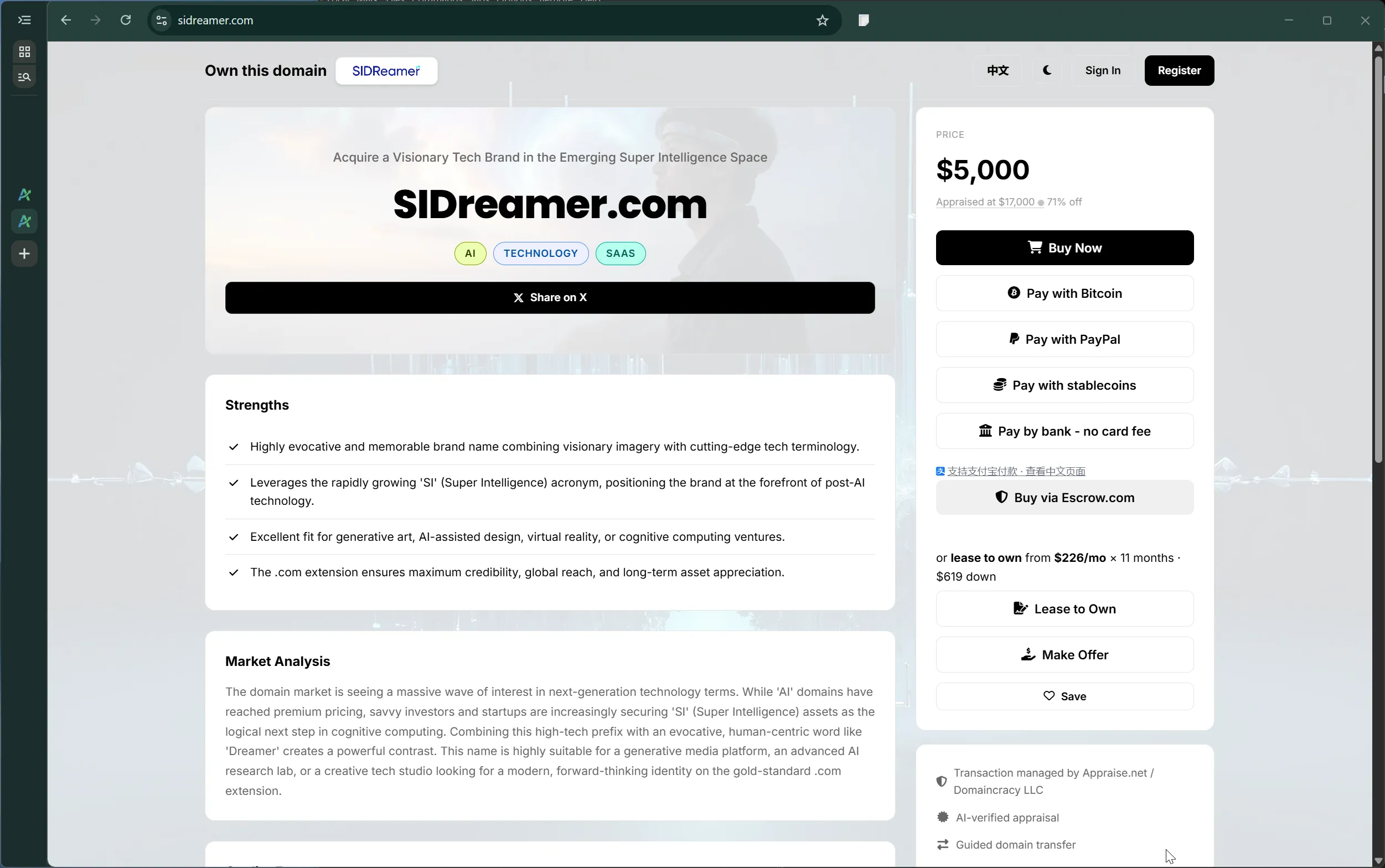
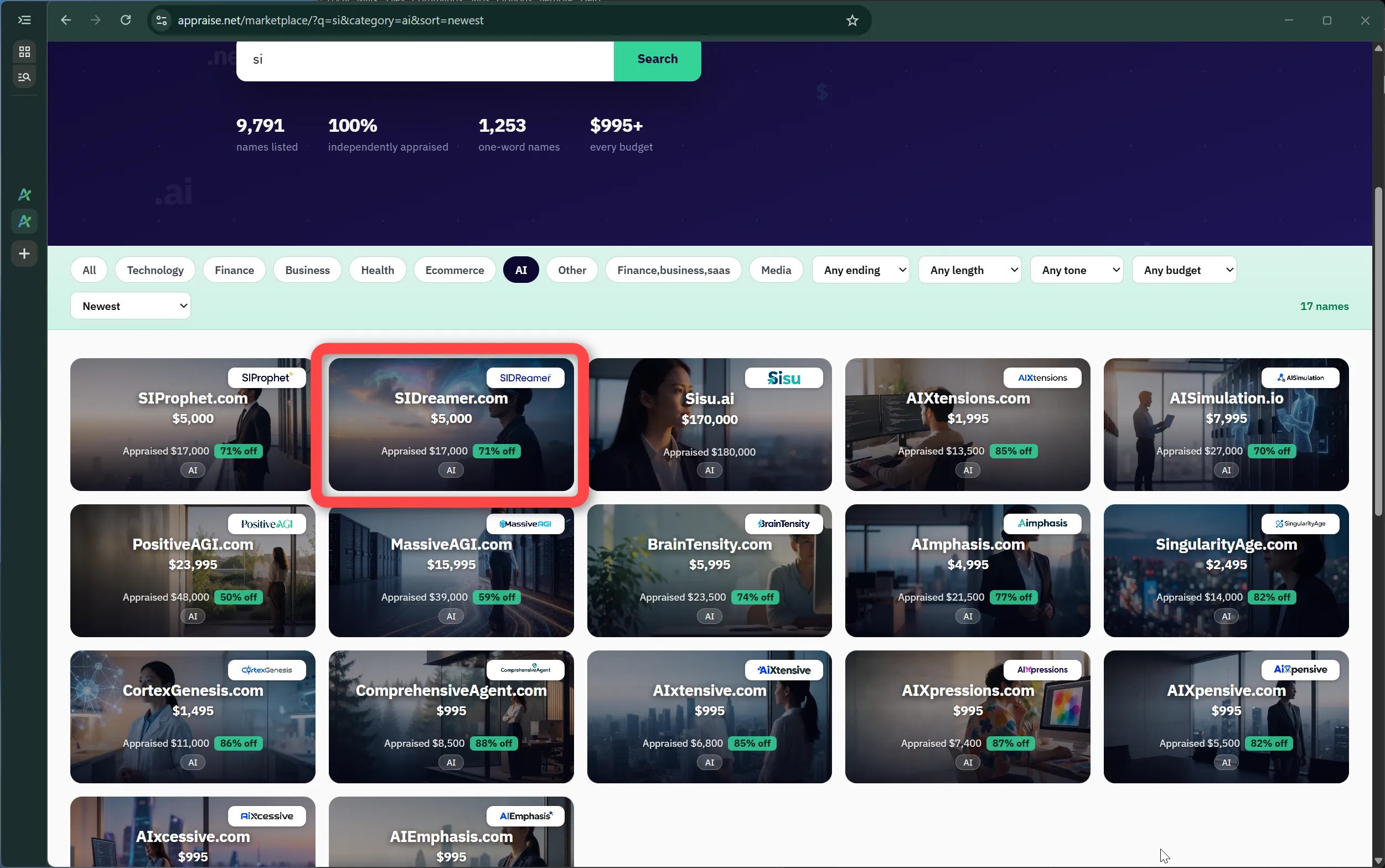
Browse the Marketplace to see how it works. You can sort by category, price, and tone. Click any listing to see the default look and feel and to see how the appraisal is used to auto-generate the page.
Bouncy.com is a clear example of how an appraisal can turn into a completed sale on the Marketplace.
Written by the founder of Domaincracy LLC, Appraise.net's parent company.
Full disclosure: Bouncy.com was my own domain, and I sold it through the exact pipeline I'm offering you.
The listing started with an appraisal
I ran an appraisal on Bouncy.com. From that single step, the listing built itself: a substantive title, the right domain categories, a written description, and a list of strengths, all drawn from the appraisal. There was no page to design from scratch. The sales page was ready to share.
A buyer arrived by typing the domain
The buyer, who stays anonymous here, did not come from a search or an ad. They typed bouncy.com directly into their browser and landed on the standalone For-Sale Page for the domain: a focused, zero-distraction sales page with a clear call to action. This is the highest-intent kind of visitor, and the For-Sale Page turned that direct type-in into a real lead.
The buyer negotiated on the deal page
From that page, the buyer opened a conversation through the offer page. We negotiated directly, and I accepted an offer of $125,000.
The sale settled through Escrow.com
To protect both sides, the sale was completed through Escrow.com. The buyer covered the escrow fees. Funds were held safely, the domain was transferred, and the deal closed cleanly at $125,000. And it moved fast: from the first offer to funds in Escrow.com was about 48 hours.
Why it matters
Bouncy.com shows the full path in action: appraise the domain, publish the auto-generated listing, capture a direct type-in visitor on the For-Sale Page, negotiate an offer, and settle securely in days, not months. Your next appraisal can be the start of the same journey.
While we are outgrowing our best expectations, we never skip on the things that protect you: security and uptime. Every page we serve, including this one, scores 105 out of 100 on Mozilla Observatory, above the maximum, for going beyond the baseline on every security header. And the Marketplace runs on geographically redundant, high-availability infrastructure with a standby ready to take over, so your listing and your buyers stay online through maintenance and outages alike.
1386 views4 helpful
Was this helpful?
Lease-to-own terms: the agreement between buyer and seller
These are the terms of every lease-to-own purchase on the Appraise.net Marketplace. The seller accepts them when they enable lease-to-own on a listing; the buyer accepts them when they start a lease. Version 2026-09-26.
1. What a lease-to-own is
The buyer pays the agreed total for the domain in installments: an optional down payment today, then a fixed monthly amount for the agreed number of months. The seller remains the registrant and owner of the domain until the final payment. Ownership transfers to the buyer only when every payment has been made.
2. Payments
The down payment, if any, is charged when the lease starts. Monthly installments are charged automatically to the buyer's card, the first one month after the start.
The buyer may change the card behind the lease at any time from their lease page.
The buyer may pay off the remaining balance at any time in one payment, by card or with Bitcoin. That ends the lease early and starts the transfer.
The seller receives each payment as it arrives, minus the Marketplace commission of 4%, except where section 6 (custody) applies.
3. Using the domain during the lease
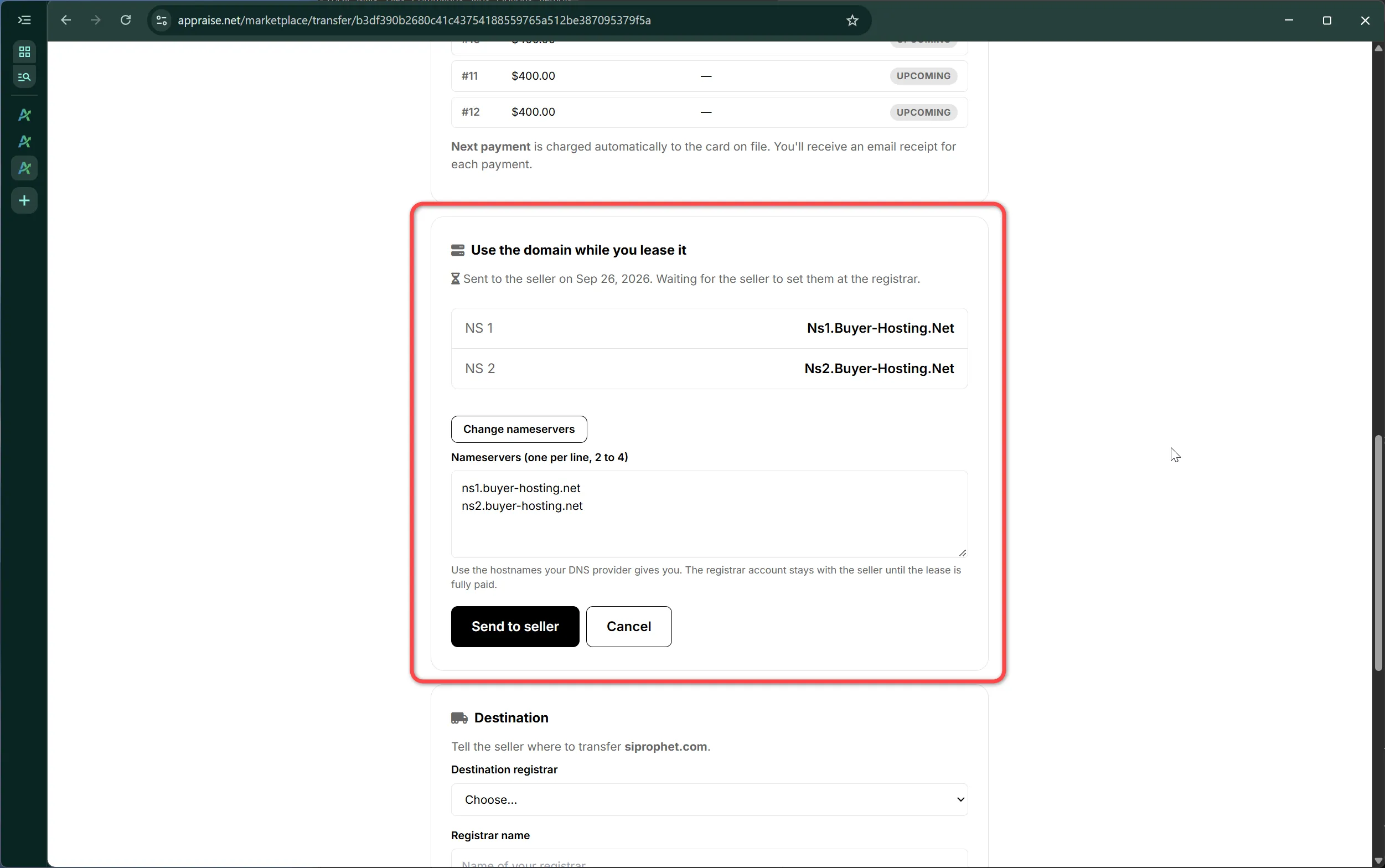
While payments are current the buyer may use the domain. The buyer names the nameservers they want, the seller sets them at the registrar, and the Marketplace verifies the change. The registrar account, the registration and all rights in the domain stay with the seller until the lease is complete. The buyer acquires no ownership interest in the domain by using it.
4. A missed payment
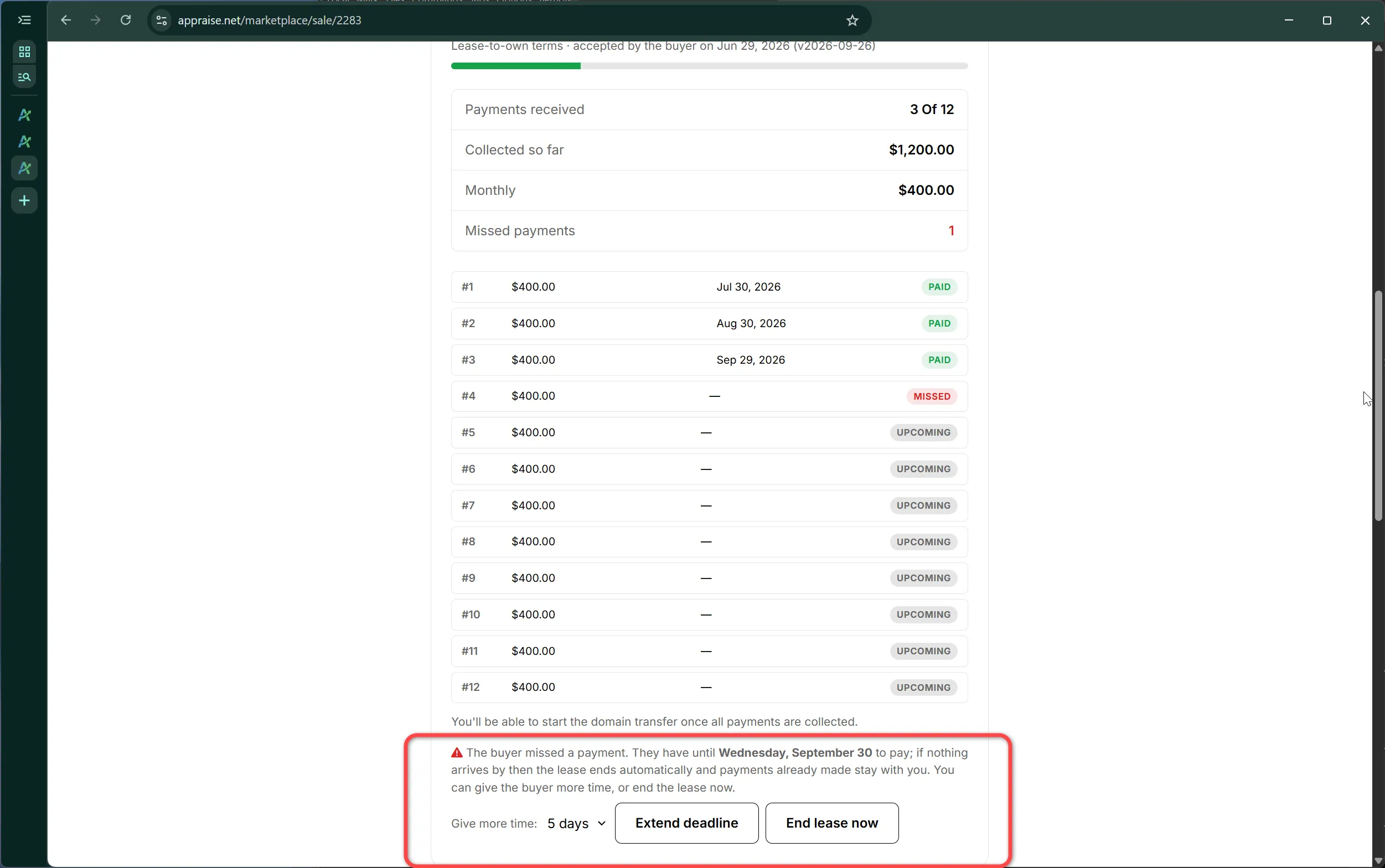
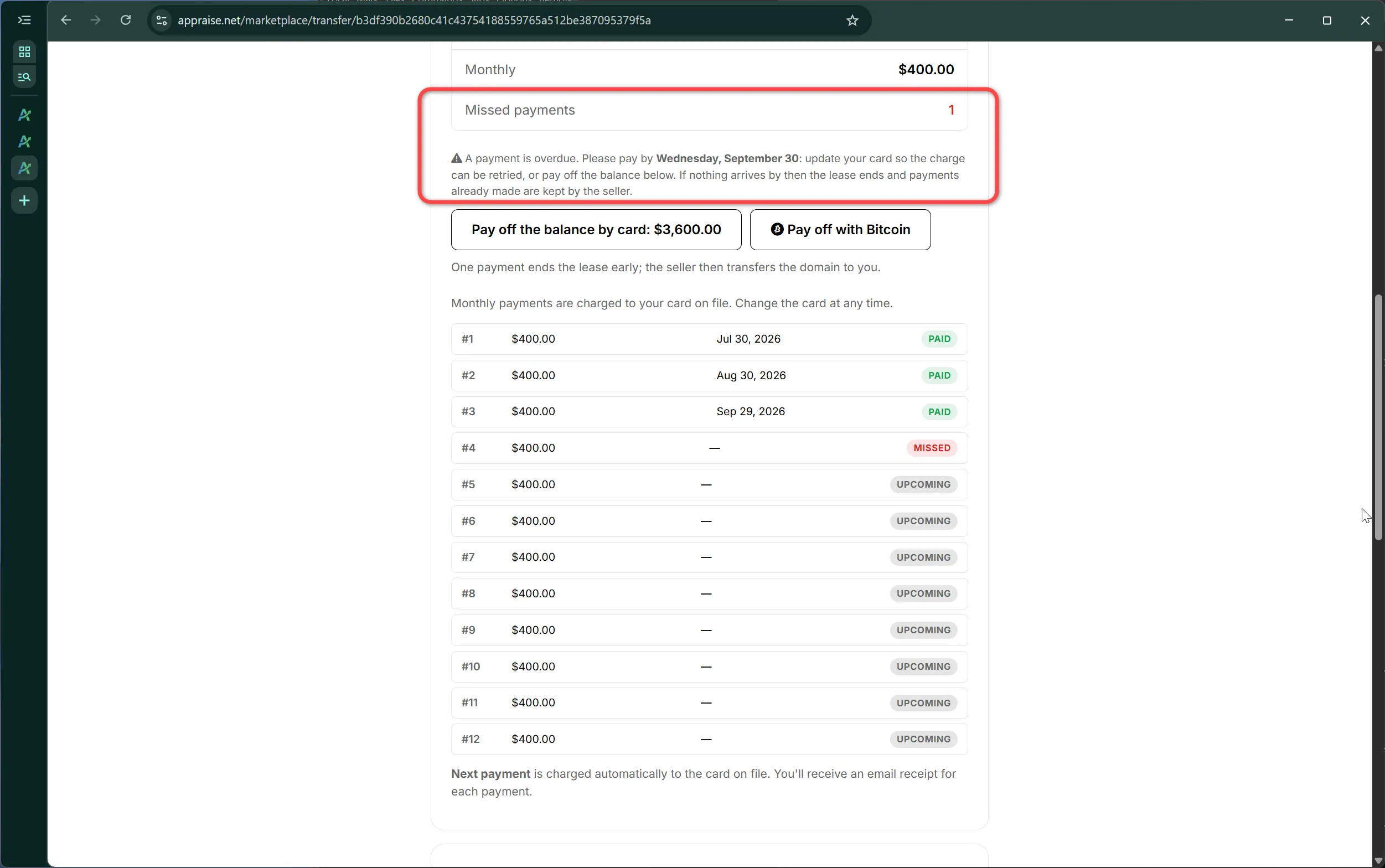
A missed installment forfeits the lease. When a charge fails, the buyer is notified at once and has 3 weekdays, to the end of that day, to make the payment, by updating the card so the charge can be retried or by paying off the balance. The seller is notified at the same time and may extend that deadline, by up to 14 days per extension, or end the lease immediately.
If the payment has not been made when the deadline passes, the lease ends automatically: no further charges are made, the listing returns to the market, and any nameservers the buyer was using are restored to the Marketplace. Installments already paid are retained by the seller as consideration for the buyer's use of the domain during the lease; they are not refunded and are not credited toward any later purchase.
5. The end of the lease
When the final installment clears, or the buyer pays off the balance, the deal becomes a transfer. The seller must push the domain to the buyer's registrar account or submit its transfer authorization code within 5 days. The buyer confirms receipt on their lease page; if the buyer does not respond within 7 days of the transfer starting, the sale completes automatically. If the seller does not start the transfer within 7 days, the Marketplace steps in on the buyer's behalf.
6. Custody (sellers other than the Marketplace)
When the seller is an independent seller, the domain is placed in a Marketplace-held registrar account for the life of the lease, by push or by transfer code, before the seller's payouts are released. The seller remains the beneficial owner: on forfeiture the domain is returned to the seller; on completion the Marketplace delivers it to the buyer. Payouts collected before custody is confirmed are held and released together once it is.
7. Ending a lease by choice
The buyer may end the lease at any time by stopping payment; section 4 then applies.
The seller may end the lease only as provided in section 4, or by agreement with the buyer in the deal thread.
Either side may open a dispute from their lease or sale page; the Marketplace decides it on the payment record, the registration snapshots it keeps, and the thread history.
8. Fees, refunds and taxes
The Marketplace commission is 4% of each payment, borne by the seller.
No Marketplace fee is charged to the buyer on lease payments. A card processing fee may apply to the payoff payment as shown before paying.
Lease payments are not refundable except where the Marketplace ends a lease because the seller cannot deliver the domain, in which case all payments are refunded to the buyer.
Each party is responsible for their own taxes.
9. Acceptance and changes
By enabling lease-to-own on a listing the seller agrees to offer the domain on these terms. By starting a lease the buyer agrees to these terms for that domain. Acceptance is recorded with the date and version. The Marketplace may revise these terms; a revision applies to leases started after it, and both sides are asked to accept the revised version before their next lease. This is version 2026-09-26.
42281 views1 helpful
Was this helpful?
QuietClose: keeping a domain purchase private
QuietClose™ is the Marketplace's private sale option. When you ask for it, we do not show the domain as sold and we do not publish the sale. The seller has committed to honor your preference, so the seller does not disclose it either.
When a sale is private
Sales are public by default. A sale becomes a QuietClose sale only when both of these are true:
The buyer asks for it, by ticking Keep this purchase private before paying.
The seller takes part in QuietClose. Sellers are enrolled by default and commit to honor the buyer's preference on every one of their listings. A seller may opt out; their listings then do not show the option.
The option appears on every listing whose seller has not opted out. It costs nothing, and it works with every payment method the listing offers, including lease-to-own.
How to use it
Buy Now or lease-to-own: tick the box in the price card on the listing page, then choose how to pay.
Accepted offer: tick the box next to the payment buttons in your deal thread, then pay.
After payment, your purchase and transfer pages show "QuietClose private sale" so you can confirm the request was recorded.
What stays private
The listing page is taken down quietly. There is no "Sold" stamp, no "Sale pending" banner and no sold page. Only you and the seller can still open it.
The listing's social preview card is withdrawn.
We do not publish, announce or report the sale, its price or the parties.
The sale is never used as an individual comparable sale in appraisals.
Card, PayPal and Bitcoin payments carry a reference number in place of the domain name.
What QuietClose cannot hide
We promise only what we control. These remain visible to anyone who looks:
Registrar, nameserver and DNS changes, and historical WHOIS or RDAP records. They can show that a domain changed hands.
Anything you or the seller choose to say about the sale yourselves.
Anything posted about the listing before the sale, such as an earlier social media post.
If you pay through Escrow.com, Escrow.com is told the domain name, because it needs it to run the transfer.
The seller's commitment
An enrolled seller commits to honor your preference. If you tick the box, the seller will not disclose the sale: not to sales databases, not on social media, not in their own marketing. If you leave it unticked, the sale is an ordinary public sale and the seller may report it as usual. If you believe a seller has disclosed your purchase, contact us. We review the evidence and the seller's response. A first violation forfeits the seller's listings and their seller account.
You are free to use your own non-disclosure agreement with the seller as well. We are not a party to agreements between buyers and sellers and do not draft, review or enforce them.
How we use private sales internally
Private sales inform our appraisal models only in aggregate. Any statistic we publish that includes private sales covers at least 10 sales, so no single sale can be worked out from it. Private sales do not appear in our accuracy examples or showcases.
When we must disclose
QuietClose keeps a sale private from the public. It does not override the law. We disclose what we are required to when faced with a valid legal demand, tax reporting duties, or the obligations of the payment and escrow providers that process the sale.
For sellers
Every seller is enrolled by default, and enrolment covers every listing on the account. We tell you on the sale page, and in the sale email, whenever a sale is private. You can opt out on your seller page, marketplace/seller, though we strongly advise against it: your listings then lose the option that privacy-minded buyers look for. A first violation of the commitment forfeits your listings and your seller account.
30504 views0 helpful
Was this helpful?
The Seller Guide: from a qualifying domain to a completed sale
This guide takes you from a qualifying domain to a completed sale, in the order things actually happen. Read it straight through the first time; afterwards each chapter stands on its own.
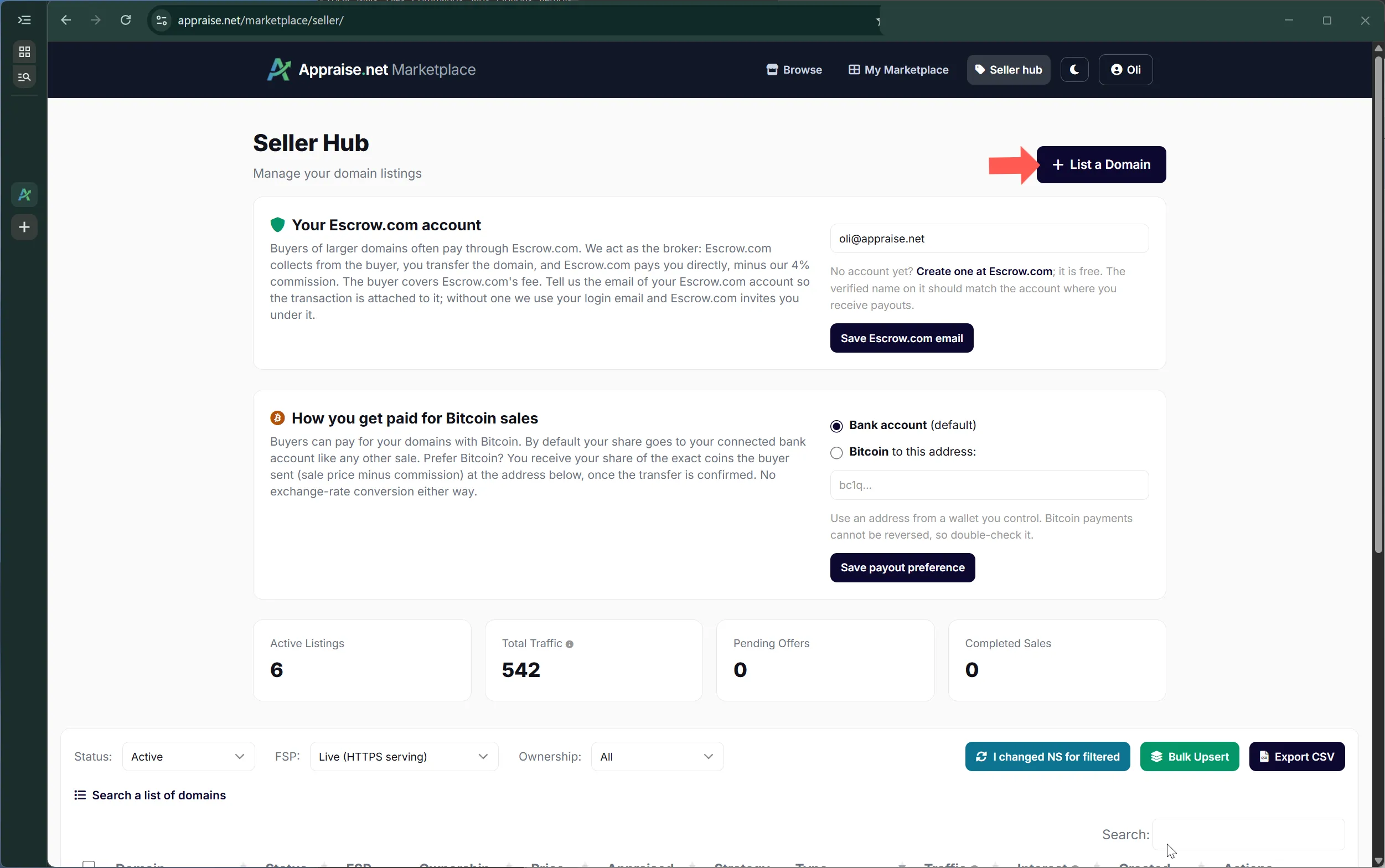
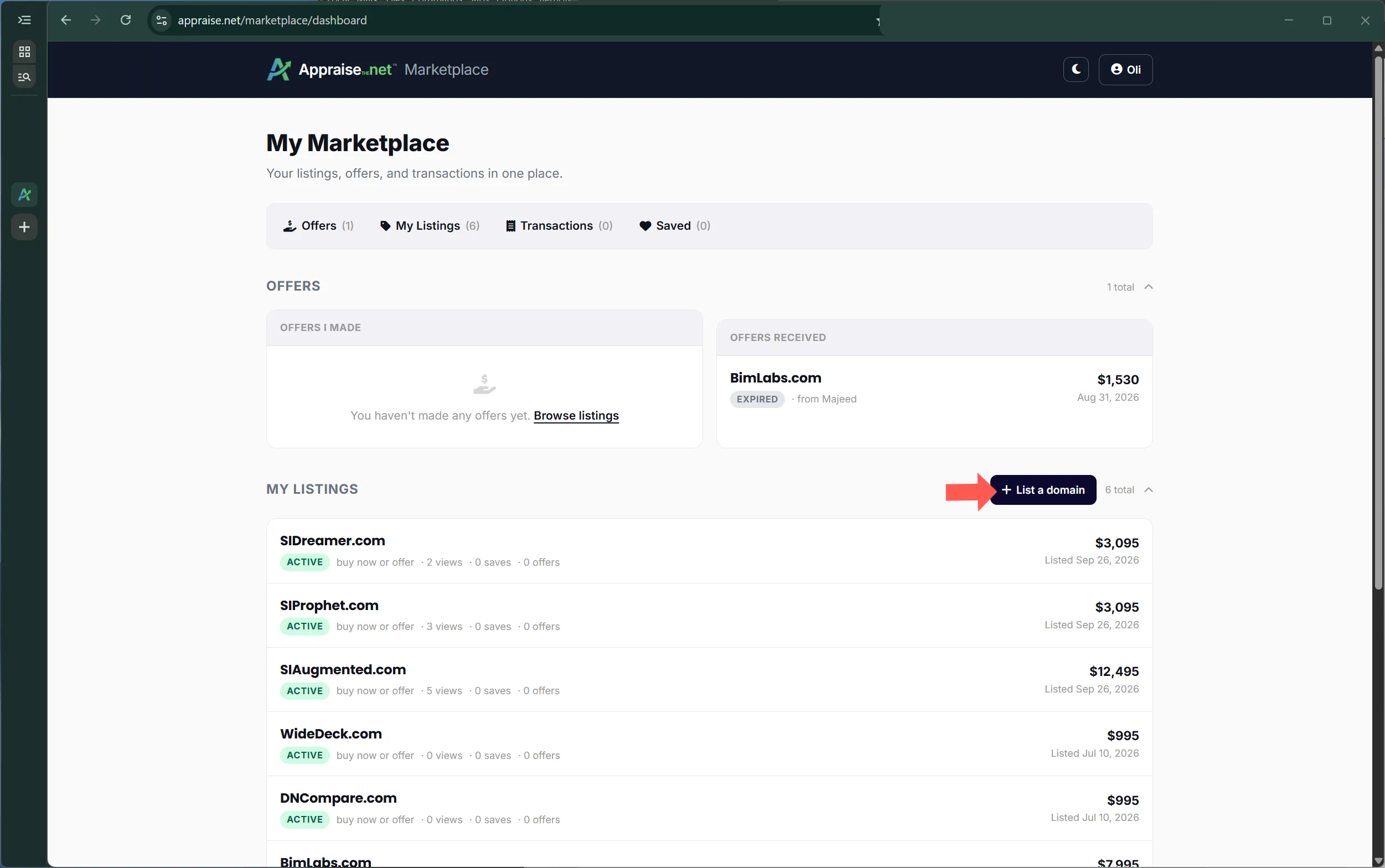
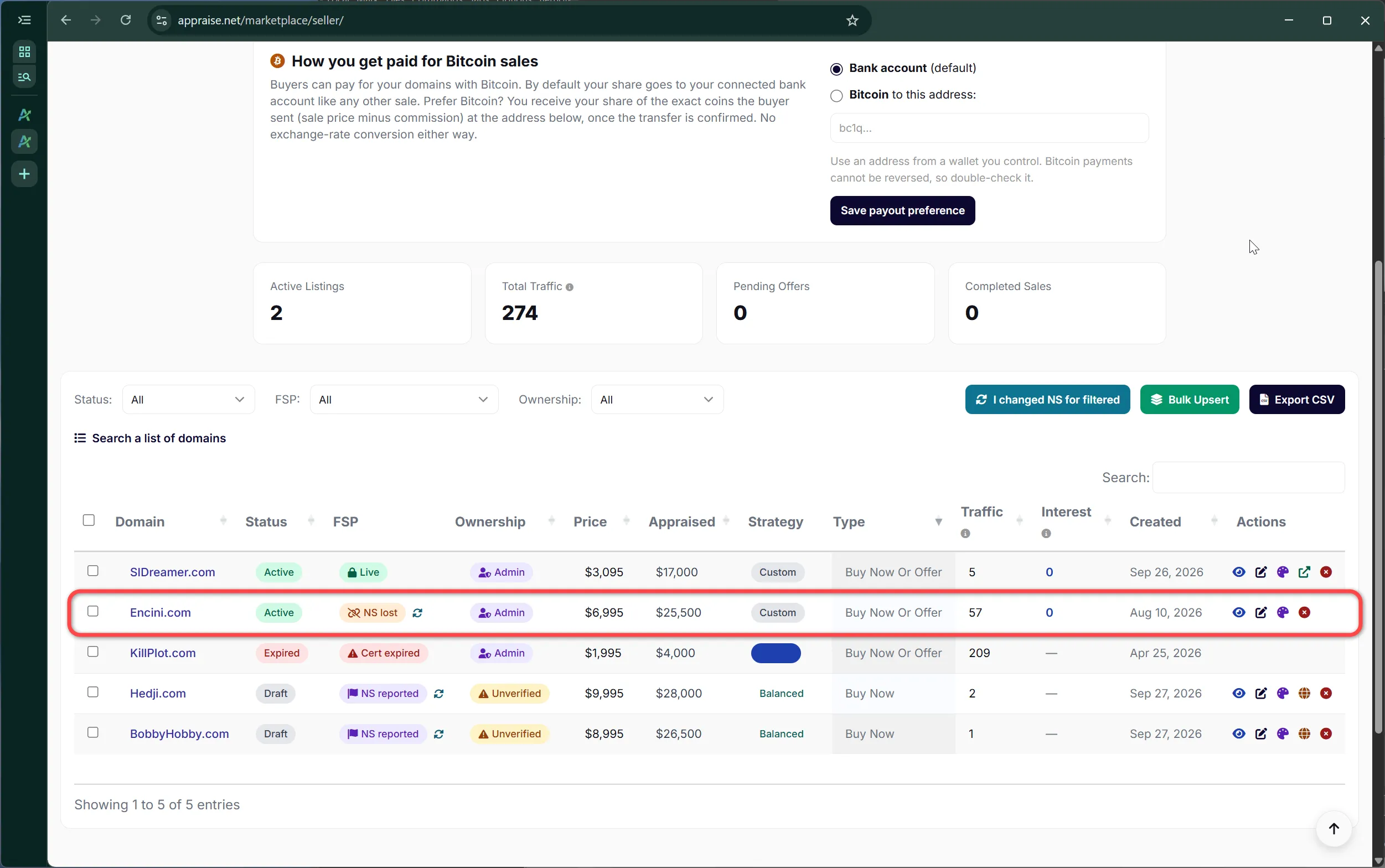
The seller dashboard: setup status, stats and your listings
111 views1 helpful
Was this helpful?
Chapter 1: What can be listed
Two things decide whether a domain can go on the Marketplace: the domain itself, and your seller setup. This chapter is about the domain.
The appraisal bar
A domain qualifies when the high end of its appraisal is at least $15,000. Appraise it first; the seller dashboard reads the result and tells you whether the name is eligible. Listing prices start at $500, and the same $500 floor applies to offers, so nothing on the Marketplace trades for pocket change.
The bar is about quality, not price. A name appraised at $15,000 to $25,000 can be listed at $2,000 if that is what you want for it. What we are filtering out is names that would never justify a buyer's time.
The listing form confirming a domain is eligible
One domain at a time
The New Listing form takes one domain. Type it, let the appraisal lookup run, choose a listing type and price, and save. The following chapters cover every field on that form.
Many domains at once
Bulk listing takes a CSV, one domain per line, in this format:
Only the domain and price are required. Listing type defaults to Buy Now or Make Offer, the minimum offer to your saved preference, and the category to the one from the appraisal. Domains that do not meet the appraisal bar are reported back, not silently skipped. Every domain still has to be appraised before it can be listed, so appraise the batch first.
The bulk listing page and its CSV format
What you need before the next step
A domain appraised at $15,000 or more on the high end
A price of $500 or more in mind
Control of the domain's DNS at your registrar, which chapter 3 uses to prove ownership
Payouts are set up before your first listing goes live, not after your first sale. The Marketplace will not publish a listing until it knows where to send your money.
The payout account
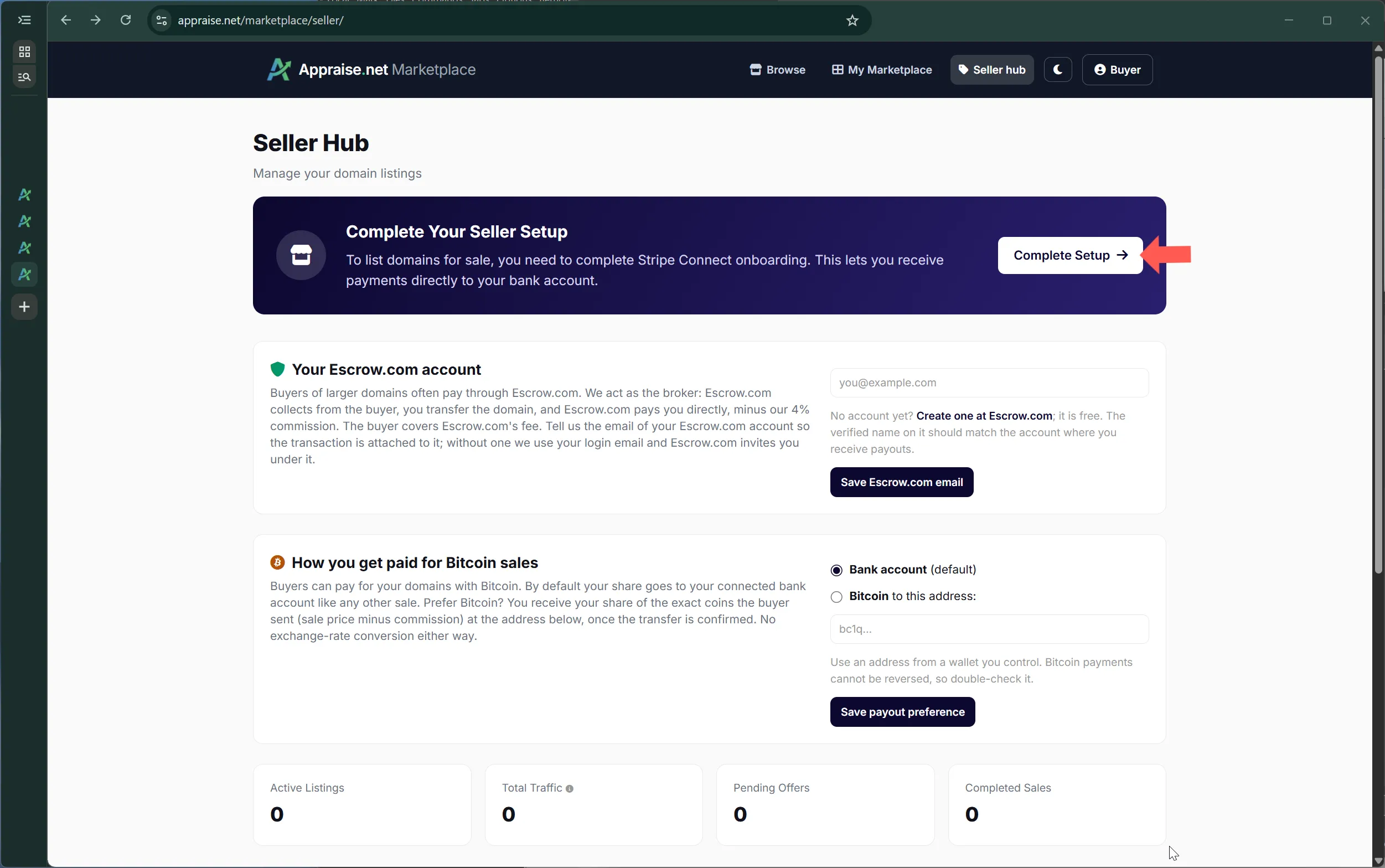
We pay sellers through Stripe, the same platform that handles the buyer's card. From the seller dashboard, click Complete Setup and you are taken through a short identity and bank-account verification. It takes a few minutes and is done once. When it completes, your dashboard shows payouts enabled and the New Listing button unlocks.
The setup banner every new seller sees firstA seller dashboard with payouts enabled
Where payouts are available
Payout setup is offered to sellers whose residence and bank account are in one of these countries:
Available in preview, so setup may ask for extra steps or not be offered to every seller yet. Click Complete Setup and see whether your country is listed:
If your country is not on either list, or setup does not offer it, choose Escrow.com as your payout method instead (next section). You can then list and sell like any other seller; only the buyer's payment options differ.
Escrow.com as your payout method
On the seller dashboard, open Outside those countries? Get paid through Escrow.com instead under the setup banner, enter the email of your Escrow.com account, confirm, and the New Listing button unlocks right away. An Escrow.com account is free and takes a few minutes to create; Escrow.com verifies your identity before it pays out, so the name on the account must be yours.
How a sale works: the buyer pays the full price through Escrow.com, by wire or by card for smaller amounts. You transfer the domain, Escrow.com confirms the buyer has it, and Escrow.com pays you directly in your country, minus our 4% commission. The buyer covers Escrow.com's own fee, and we never hold your money.
What buyers see: a single Buy via Escrow.com button on Buy Now listings, and Escrow.com as the way to pay an accepted offer. Card, PayPal, Bitcoin and bank-debit payments are not offered, because those settle through our payout platform.
No lease-to-own. Installment plans run through our payout platform, so the add-on is not available while Escrow.com is your payout method. Buy Now, Make Offer and Buy Now or Make Offer work as usual.
Everything else is the same: the appraisal bar, ownership verification, pricing tools, QuietClose, your sale pages and the 4% commission.
Switching later: if our payout platform becomes available in your country, complete the payout setup from the dashboard and every payment option opens up on your listings automatically.
What it costs
Our commission is 4% of the sale price, taken from the amount you receive. On a $10,000 sale you receive $9,600. There are no listing fees, no monthly fees and no charge for the sale page, the images or the certificate. Whatever a buyer pays on top of the sale price, such as a card processing fee, goes to the payment provider, never to you and never to us.
When you get paid
For a Buy Now sale, the buyer's money is held in escrow from the moment they pay until the buyer confirms they have received the domain, or the automatic release described in chapter 8 kicks in. Your payout is issued at that moment. For a lease-to-own deal you are paid each installment as it comes in, less commission, with one exception covered in chapter 11.
Getting paid in Bitcoin instead
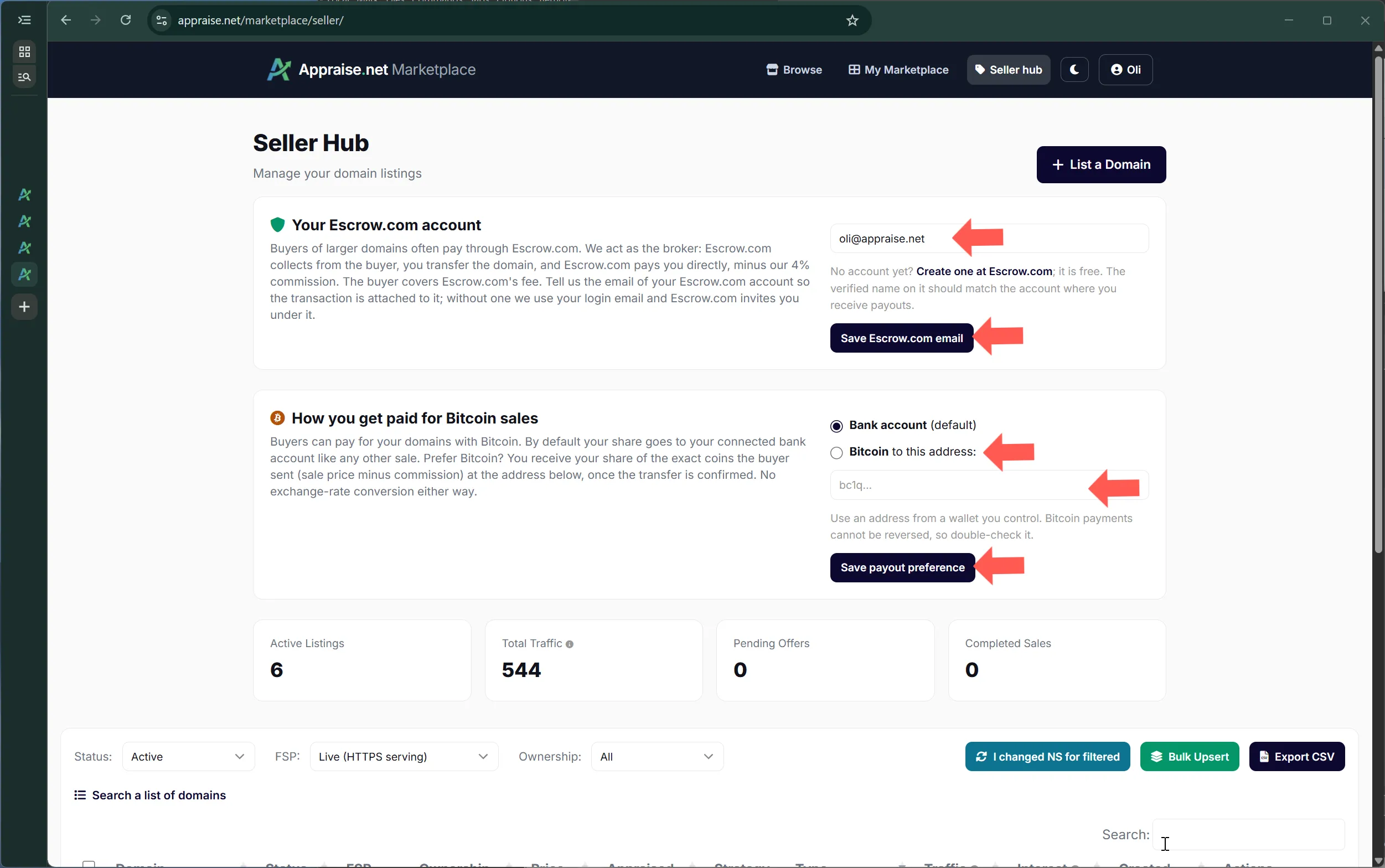
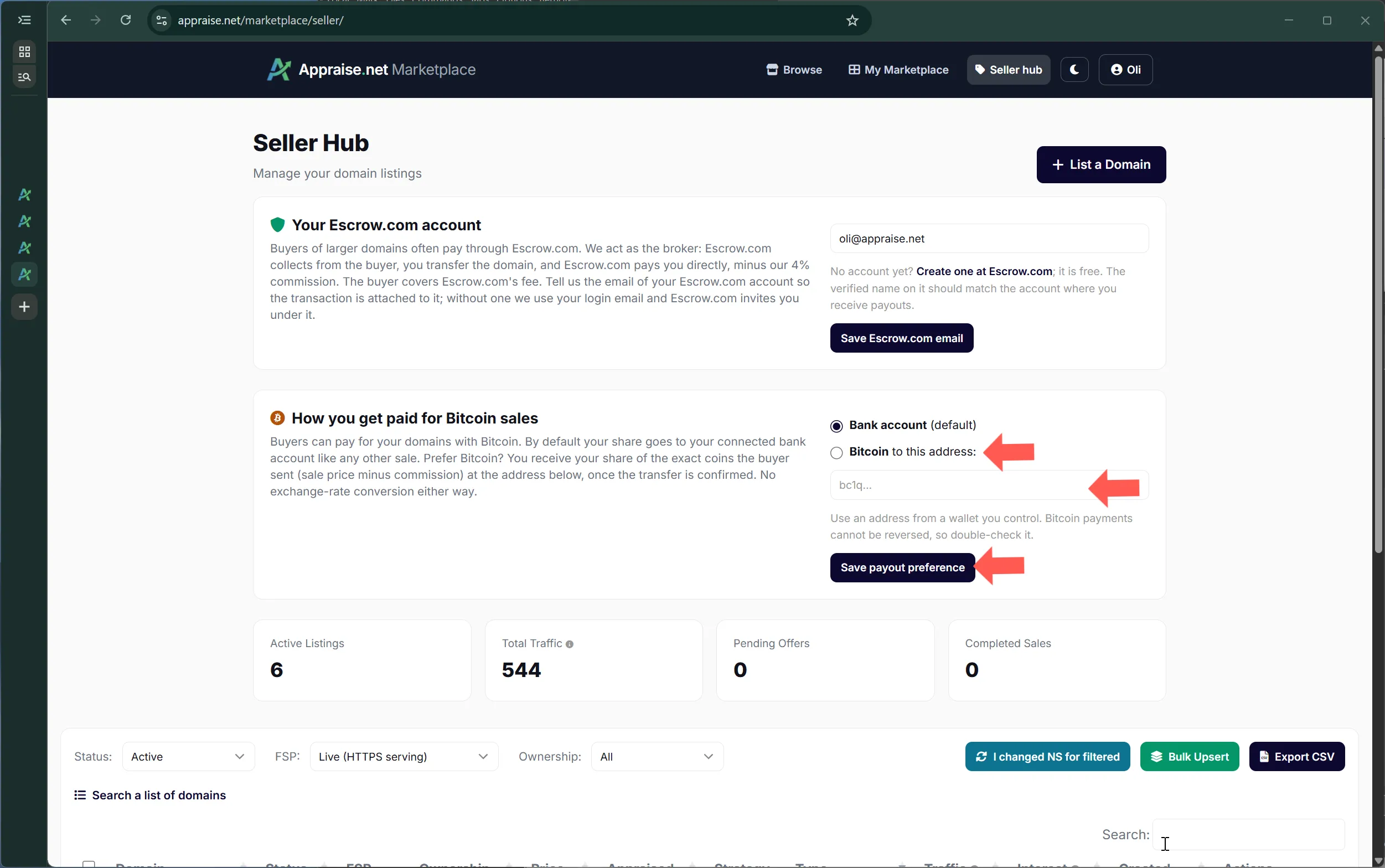
Buyers can pay with Bitcoin. By default that makes no difference to you: your share arrives in your bank account in dollars like any other sale. If you would rather receive Bitcoin, set a Bitcoin address on the seller dashboard and, for sales paid in Bitcoin, you receive your share of the exact coins the buyer sent, the sale price minus commission. No exchange-rate conversion happens either way, so neither side carries rate risk. The setting applies to future sales and can be changed any time.
Choosing Bitcoin as the payout method
Your Escrow.com account
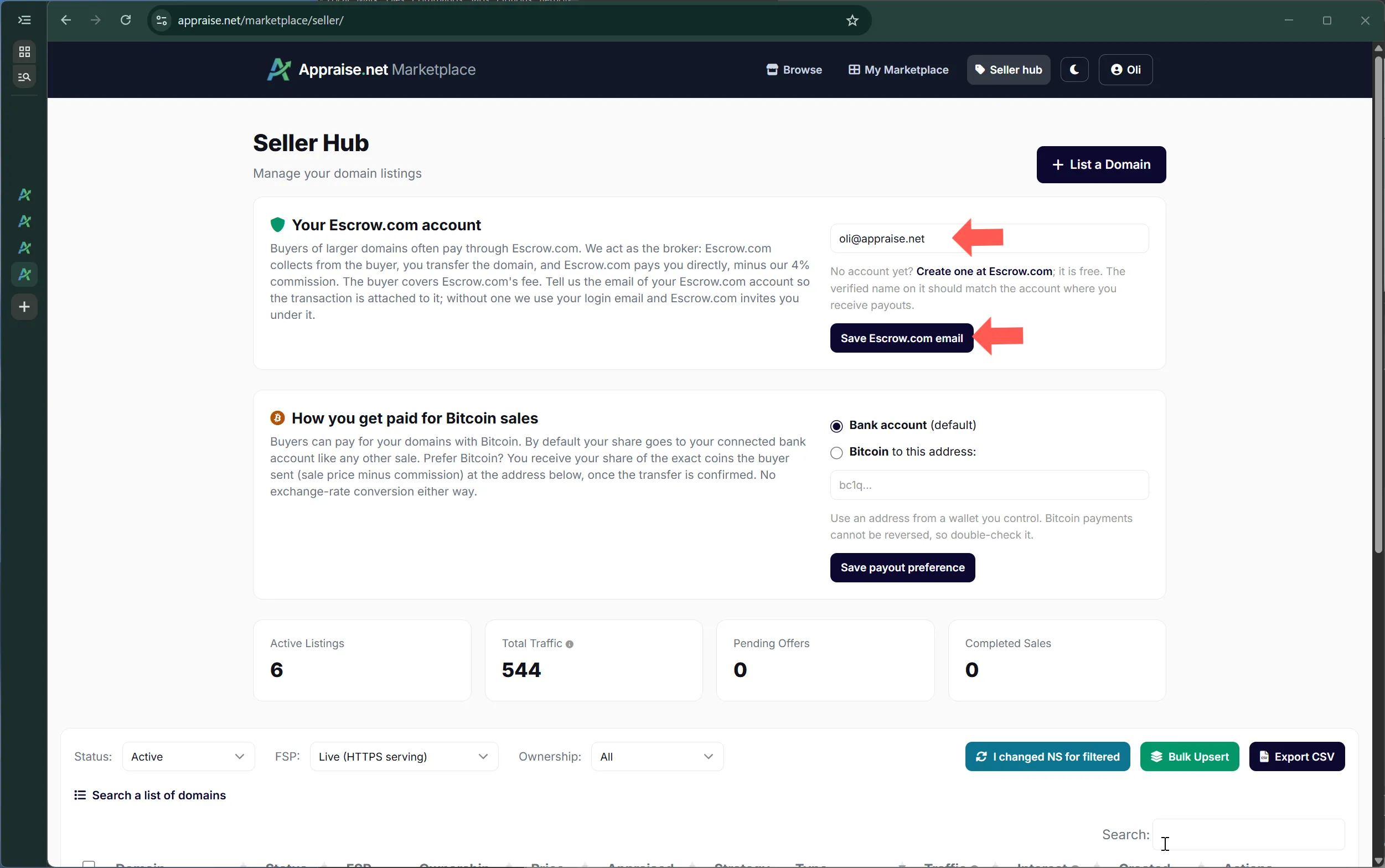
Buyers of larger domains often pay through Escrow.com, and on those sales the money never touches your payout account: we act as the broker, Escrow.com collects from the buyer, you transfer the domain, and Escrow.com pays you directly, minus our 4% commission. The buyer covers Escrow.com's own fee. For that to work Escrow.com has to know which account is yours, so tell us the email your Escrow.com account uses on the seller dashboard. If you leave it blank we use your login email and Escrow.com invites you under it, which is fine if you register with that address. An Escrow.com account is free to create.
Telling us which Escrow.com account is yours
QuietClose private sales
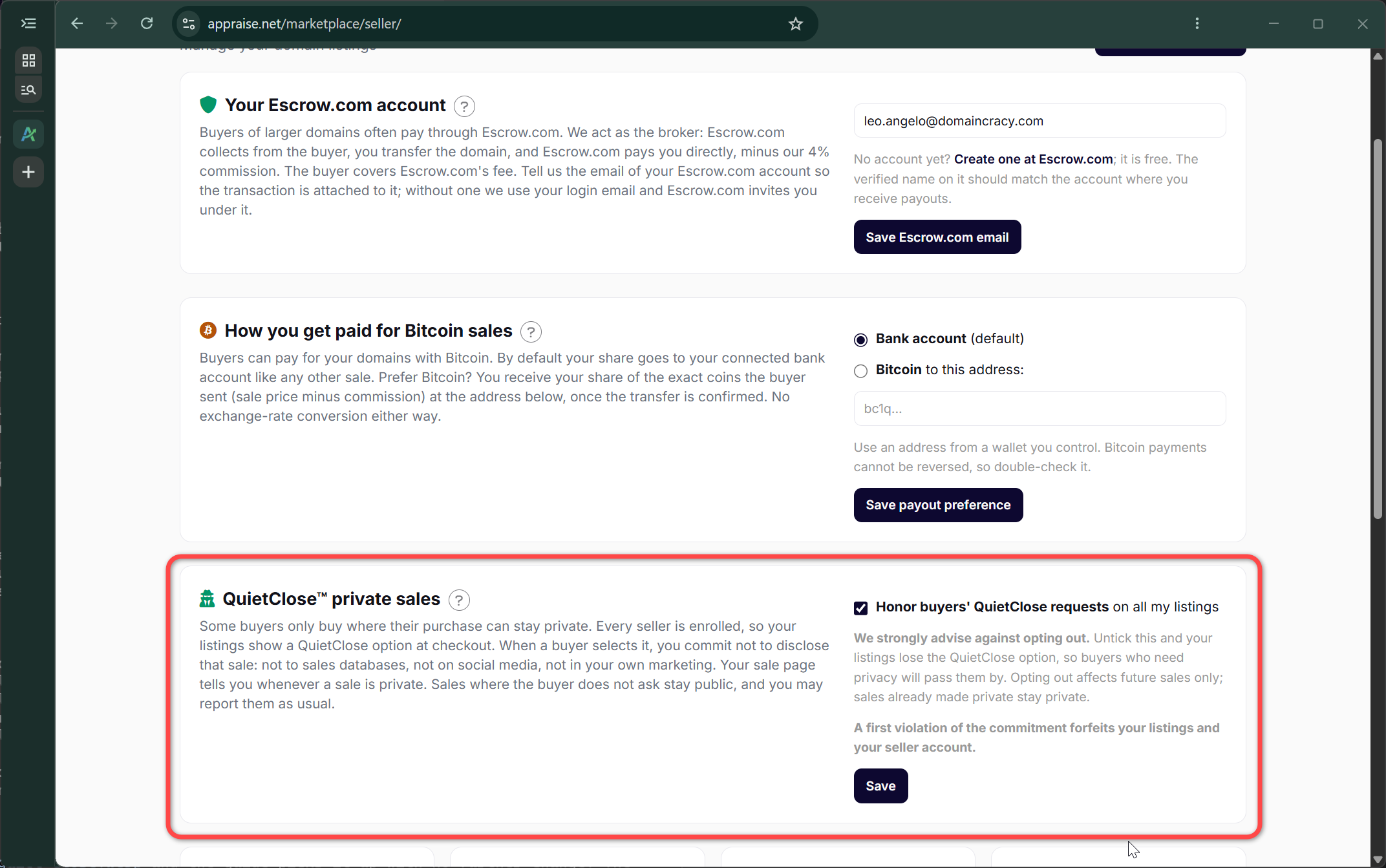
Some buyers only buy where their purchase can stay private, such as a company preparing a launch or a buyer acquiring several names. QuietClose lets them ask for that at checkout. Every seller is enrolled by default, so your listings show the option without any setup. When a buyer selects it, you commit not to disclose that sale: not to sales databases, not on social media, not in your own marketing. We take the listing down quietly, with no Sold stamp, and your sale page and sale email tell you that the sale is private. Sales where the buyer does not ask stay public, and you may report them as usual. You can opt out on the seller dashboard by unticking "Honor buyers' QuietClose requests". We strongly advise against it: your listings lose the option, and buyers who need privacy will pass them by. Opting out affects future sales only. A first violation of the commitment forfeits your listings and your seller account. The full policy is in QuietClose: keeping a domain purchase private.
The QuietClose card on the seller dashboard
If your payout account goes quiet
If nothing has been paid out for around six months, the payment platform may ask you to re-confirm your details before the next payout. You will get an email if that happens; the money waits safely until it is done.
Before a listing goes live we confirm that you control the domain. There are two ways to do it, and the one you choose also decides where your sale page lives.
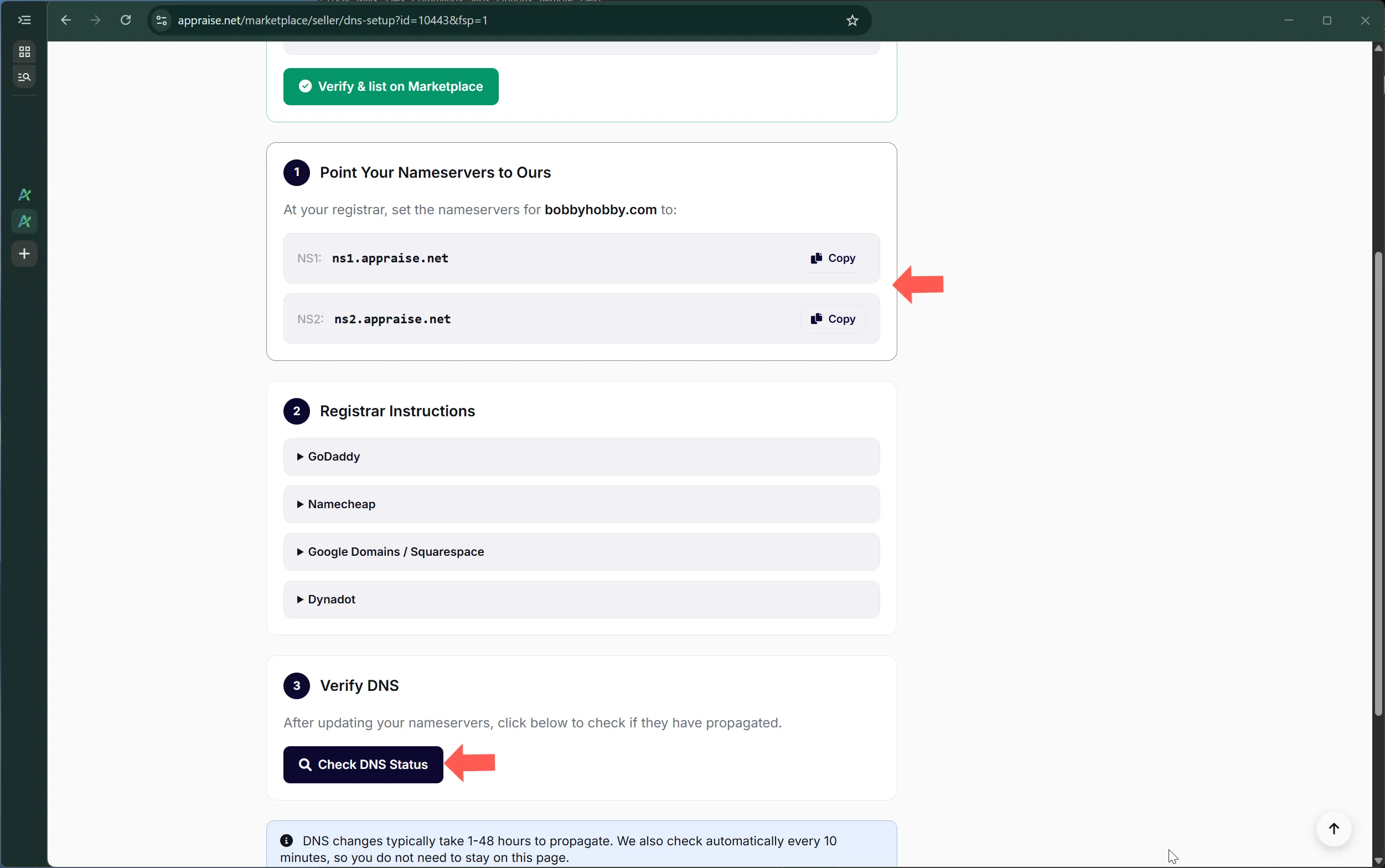
Option A: point the domain to our nameservers (recommended)
Set the domain's nameservers at your registrar to ns1.appraise.net and ns2.appraise.net. Within a few minutes of the change propagating, we detect it, mark the listing verified, and the domain itself starts serving your sale page over HTTPS with its own certificate. Anyone who types the domain into a browser lands on your listing. This is what most buyers respond to: the name they want, already telling them it is for sale.
The nameserver instructions on the DNS setup pageRegistrar instructions and the Verify DNS step
You keep the registrar, the renewal and full ownership; only DNS is delegated to us while the listing is active. If you use the domain for email today, note that pointing nameservers to us replaces its DNS entirely, so an actively used domain is better suited to option B.
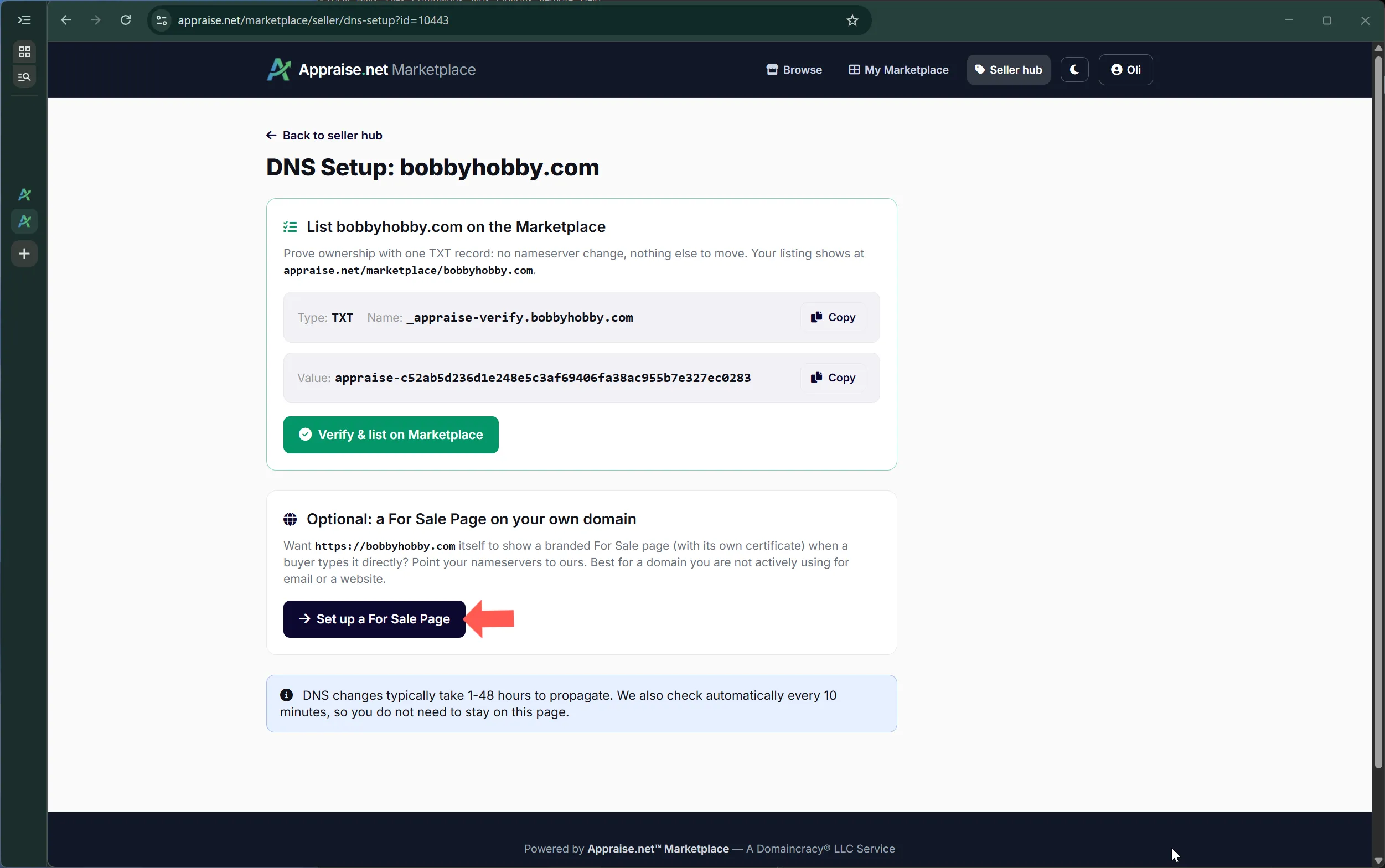
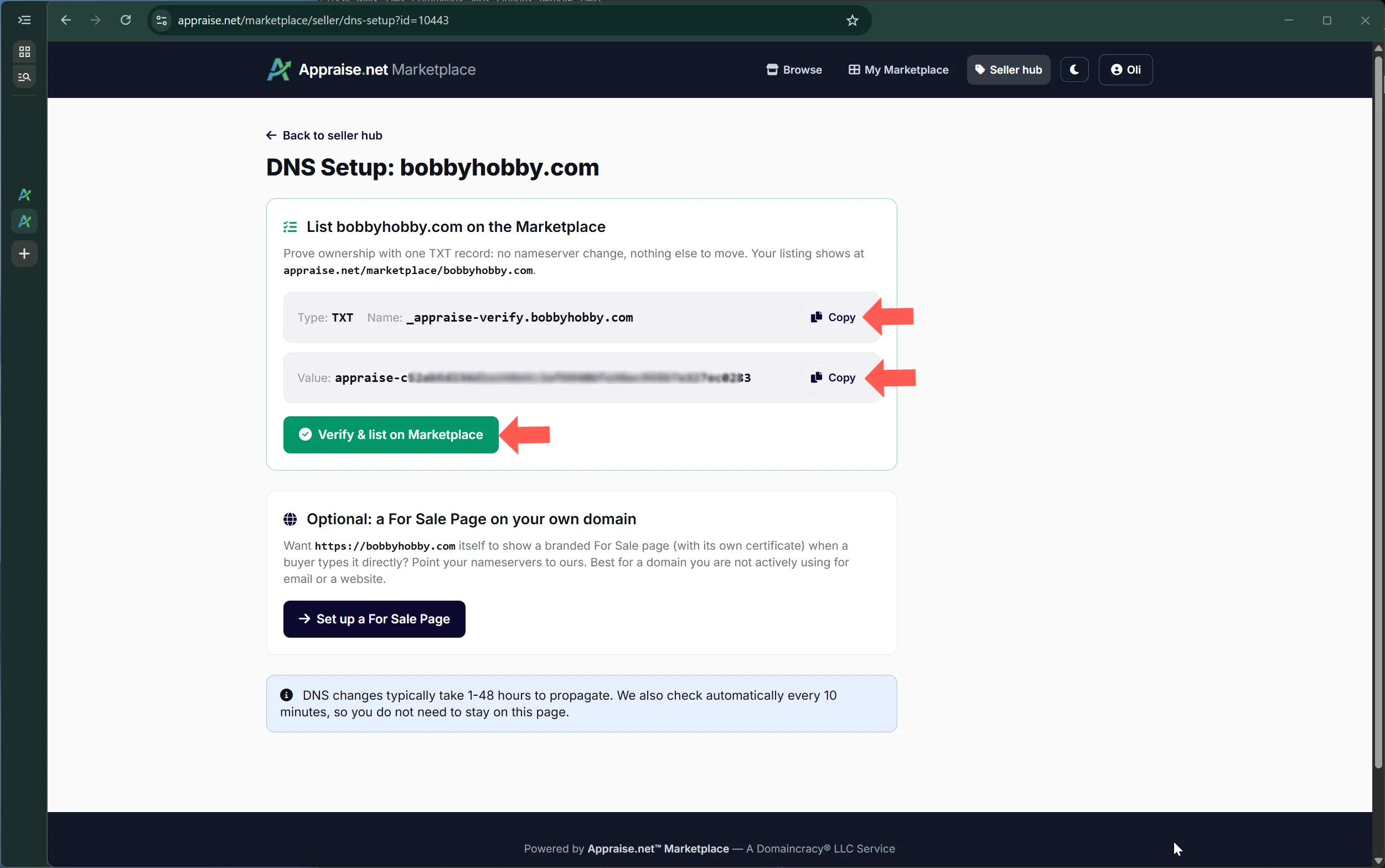
Option B: add a TXT record (on-platform only)
Create a TXT record named _appraise-verify.yourdomain.com with the value shown on the DNS setup page, and click Verify. Nothing else about the domain changes. Your listing is live on the Marketplace and reachable through search, categories and the link you share, but the domain itself keeps pointing wherever it points today.
The TXT record instructions
What each option gives you
Nameservers: sale page on the domain, certificate included, Marketplace listing, eligible for lease-to-own with the buyer's nameserver option, and we can re-check control automatically before every sale.
TXT record: Marketplace listing only. Simplest when the domain is in use, or when you only want the exposure.
The re-check before money moves
At the moment a buyer starts paying, we re-verify control the same way we verified it originally. If the nameservers or the TXT record have changed in the meantime, the purchase is paused and the buyer is asked to try again shortly, rather than paying for a name you no longer control. Keep the record or the nameservers in place for as long as the listing is active.
A listing is mostly built for you. The appraisal already knows what the name means, who buys names like it and what it is worth, so the listing starts from that and you adjust what you want.
Generated from the appraisal
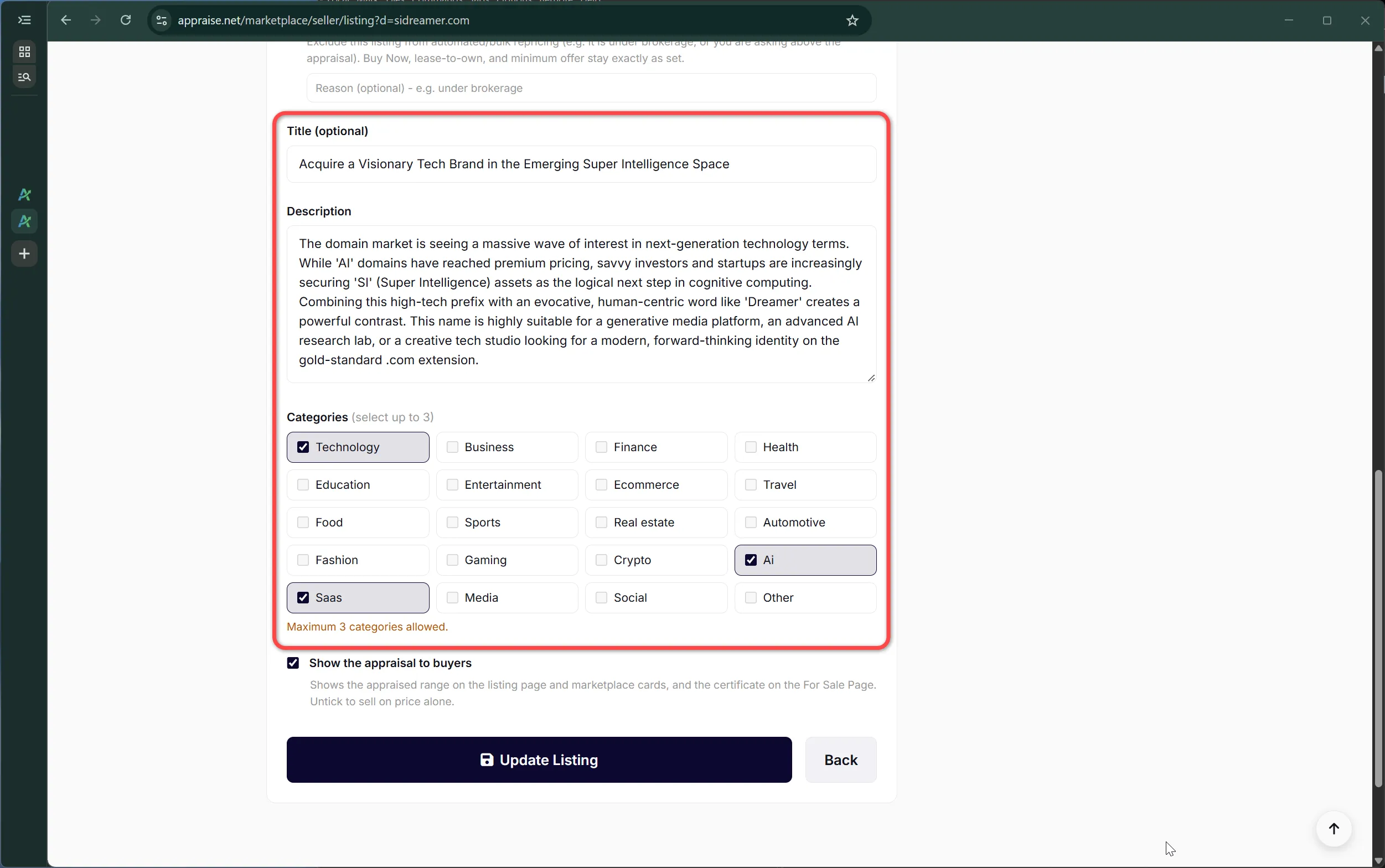
Headline and description. A one-line title and a market analysis written for buyers, drawn from the appraisal. Edit either freely; your text always wins.
Brand images. A logo concept and a hero image for the name, generated when the listing is created. You can regenerate them once for free from the listing, and they are used on the sale page, the Marketplace card and the link preview when the listing is shared.
Category. The appraisal's best-fit category, used for browsing and for the images. Change it if you know the buyer better than the appraisal does.
Word components and analysis factors from the appraisal, which give buyers the reasoning behind the value.
Title, description and category filled in from the appraisal
What you decide
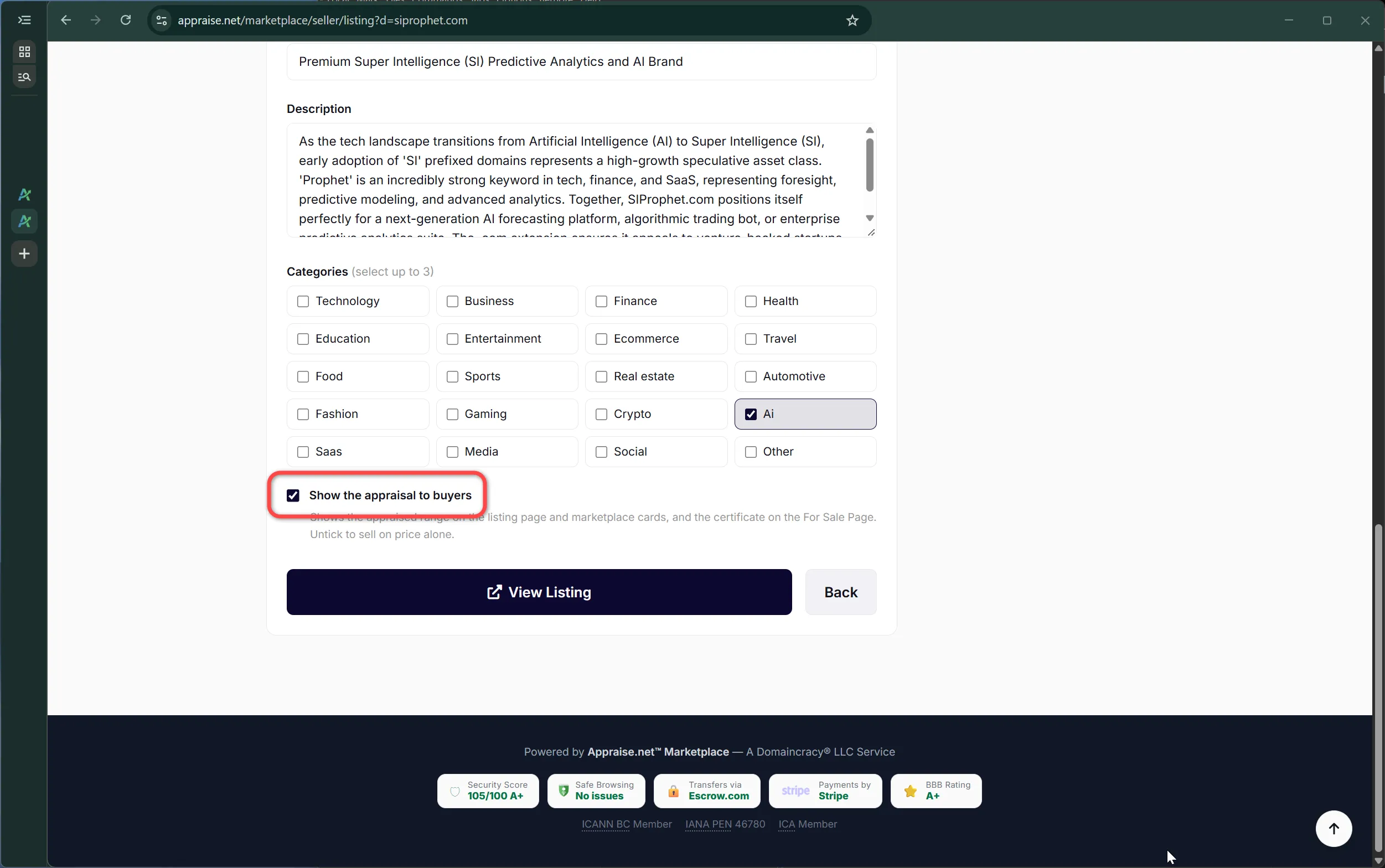
Show the appraisal. A checkbox on the form. When on, the listing shows "Appraised at $X" with a link to the certificate; buyers take a price more seriously when they can see where it came from. Turn it off if you are asking well above the appraisal and would rather not invite the comparison.
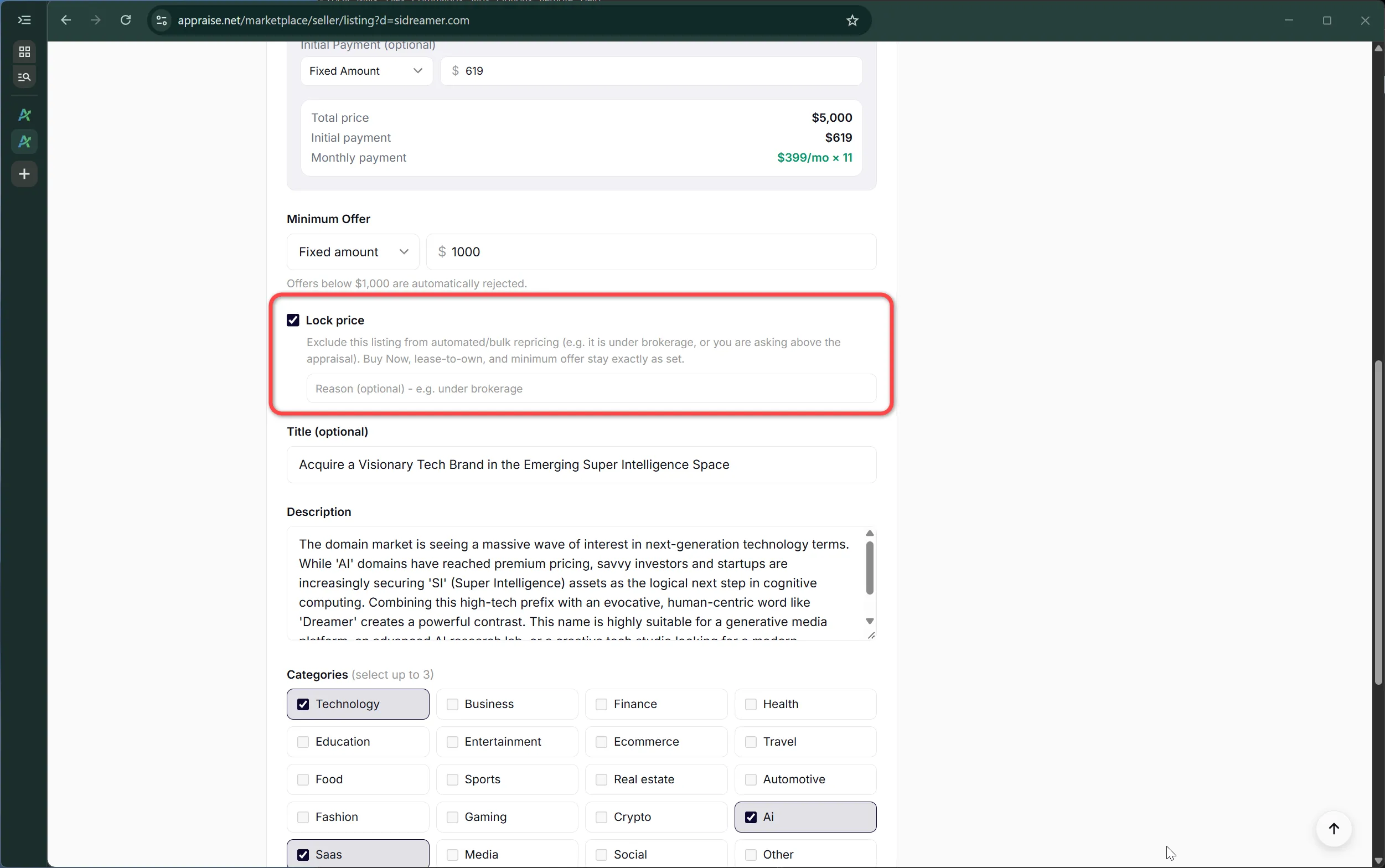
Price lock. Excludes the listing from any automated or bulk repricing you run later; useful for a name under brokerage or priced deliberately above its appraisal. Buy Now, lease-to-own and minimum offer stay exactly as set until you change them by hand.
Look and feel. Colors, background and layout, covered in chapter 6.
The show-appraisal and price-lock controls
What buyers see
The sale page carries the brand images, the headline, the price and payment buttons, the appraisal reference if enabled, the description, and the analysis behind the value. The same listing appears as a card on the Marketplace and in category browsing, and a compact version is generated automatically for social links.
Chapter 5: Listing types and the lease-to-own add-on
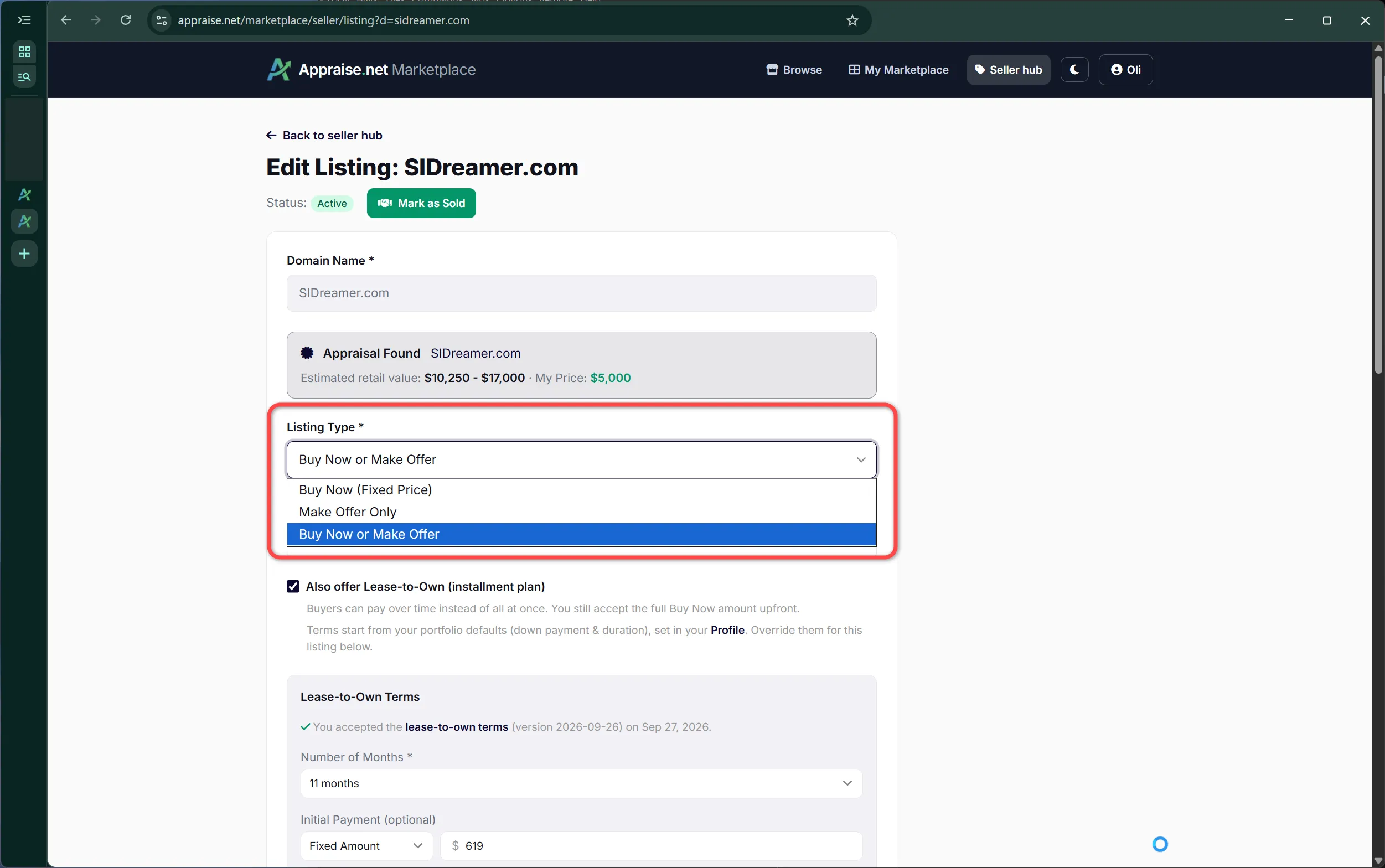
Every listing has one of three types, and any of them can carry the lease-to-own add-on.
The three listing types
Buy Now (fixed price). The buyer pays your price and the transfer starts. No negotiation.
Make Offer only. No price is shown; buyers open with an offer at or above your minimum and you negotiate in the deal thread (chapter 9).
Buy Now or Make Offer. Both buttons. Most listings use this: the price anchors the conversation and the offer button catches buyers who want to talk.
The three listing types
Minimum offer
For any type that accepts offers, set the smallest offer you are willing to see, either as a percentage of the Buy Now price or as a fixed amount. Offers below it are rejected before they reach you. A sensible default is 5% of Buy Now, which filters out noise without discouraging real buyers; you can set a portfolio-wide default on your profile so every new listing starts with it.
The lease-to-own add-on
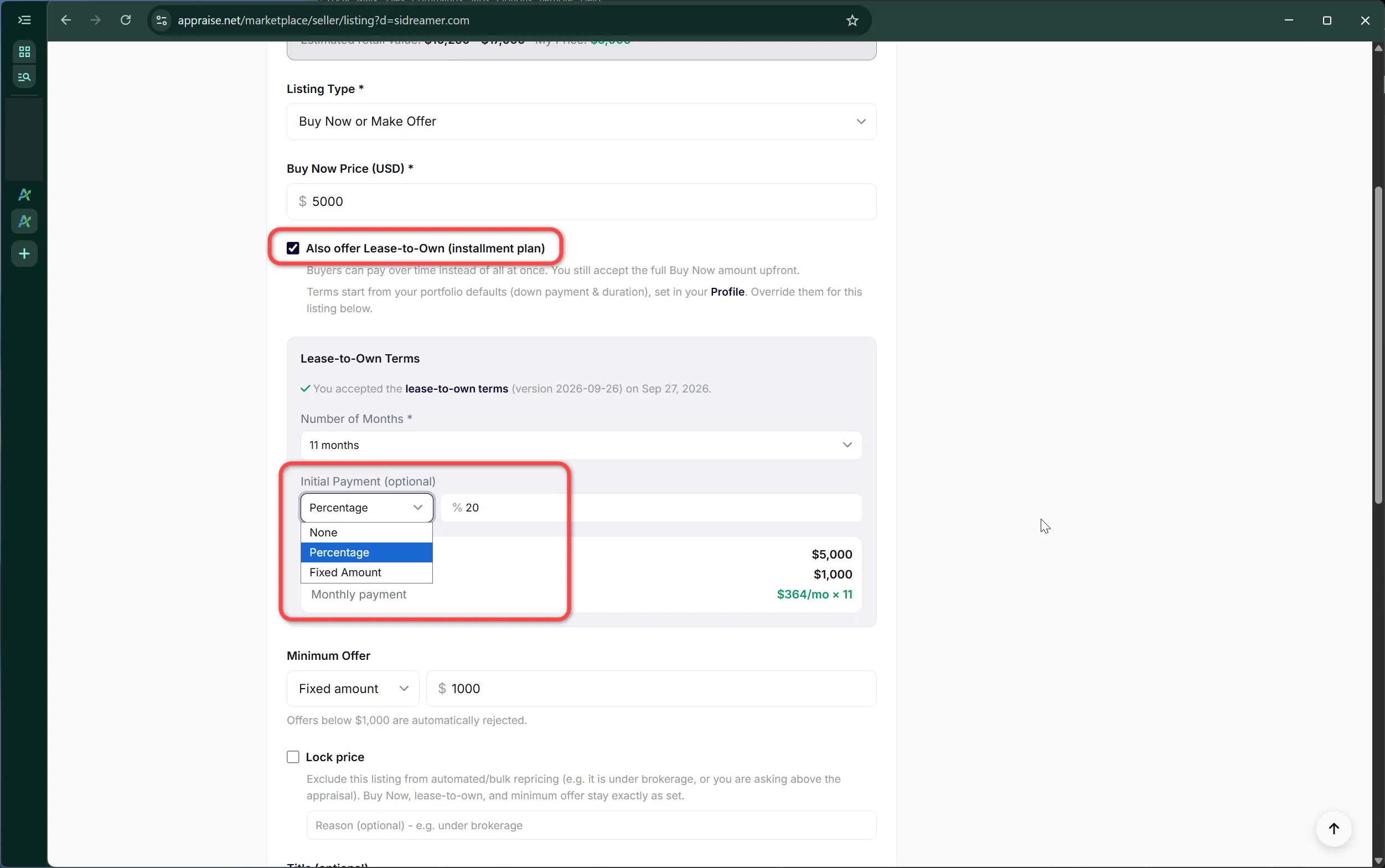
Tick "Lease to own" on any listing to let a buyer pay in monthly installments instead of all at once. You set the terms:
Term: 3, 6, 9, 12, 18, 24, 36, 48 or 60 months.
Down payment: none, a percentage of the price, or a fixed amount.
Total price: shown to the buyer as the monthly amount times the term plus the down payment. Many sellers set the lease total a little above the Buy Now price to reflect the time value.
Lease-to-own terms on the listing form
A buyer can also pay off the remaining balance at any point with a single payment, which ends the lease early and starts the transfer. The buyer's side of a lease, what happens to the domain during it and how a missed payment is handled are in chapter 10. Whether you need to place the domain in custody first is in chapter 11.
Your sale page does not have to look like everyone else's. The Look and Feel tool changes colors, backgrounds and shape, either for one listing or as the default for your whole portfolio, with a live preview as you go.
Where it is
Open it from the seller dashboard or from any listing's edit page. The left side is the controls; the right side is your actual sale page, updating as you change things.
The Look and Feel tool with its live preview
What you can change
Style preset. Start from one of the ready-made palettes. Each sets a coordinated set of colors for light and dark mode.
Color assignments. Assign the palette's colors to the accent (buttons and highlights), text and surfaces. The payment buttons pick up your accent automatically, including their hover state.
Background image. Choose an image by category and set its opacity so text stays readable.
Borders, radius, shadow and width. The shape of the price card and content blocks.
Preview theme. Check the page in light, dark and auto before saving; buyers see whichever their device prefers.
A restyled sale page in the live preview
Listing, category or portfolio
The Editing switch at the top chooses the scope of what you are styling: this one listing, every listing in a category, or your portfolio defaults. The most specific style wins: a listing's own style beats its category's, which beats the portfolio default. So a hundred names can share one look, the finance names can carry their own, and a few premium ones can be styled individually.
Templates
Two page templates exist, a standard and an enhanced layout with more room for the analysis. Both respect your colors and background.
Chapter 7: Pricing, minimum offers and reading interest
Pricing is yours. This chapter is about the mechanics around the price, and about reading the signals your listing produces.
Price, minimum offer and the appraisal
The appraisal is a market estimate for a typical buyer. Your price is what you ask a particular buyer. They are different numbers and it is normal for the ask to sit above the appraised range; showing the appraisal on the listing gives that ask a floor in the buyer's mind rather than a ceiling. A minimum offer that is too low invites lowballs; too high and serious buyers who wanted to open a conversation walk away. 5% to 10% of Buy Now is the usual band.
Offer expiry
Offers and counter-offers expire after 14 days by default. When you send a counter you can set your own expiry anywhere between 3 and 30 days. Expired offers close automatically; nobody has to chase them.
The price lock
If you use bulk repricing across your portfolio, lock the listings that should not move: a name under brokerage, a name priced deliberately above its appraisal, a name with a live negotiation. Locked listings are skipped by any automated change and keep every number exactly as you set it. Lock or unlock one listing on its edit page, or many at once from the seller hub: select the rows, set Price lock in the Update Selected panel to Lock or Unlock, and apply. Unlock can travel in the same click as a reprice.
A price-locked listing with its reason
Reading interest
The seller dashboard shows traffic per listing, but raw traffic includes scanners and type-in visits that never become buyers. The signals worth watching are offers, saves and logged-in views. A name with steady saves and no offers is usually priced too high for the interest it is drawing; a name with offers below your minimum is telling you where the market sits.
Chapter 8: Buy Now: payment methods, escrow and the transfer
This is the chapter to read before your first sale. It covers what the buyer sees, every way they can pay, and exactly what you do once they have.
How a buyer can pay
Card. Instant. The buyer pays a 3% processing fee on top of your price.
Bank debit (US). No fee. Settles in a few business days, and the sale is marked paid when it does. Available up to $140,000.
Stablecoins. No fee. The payment processor verifies the buyer's identity.
Bitcoin. No fee, any price, complete buyer privacy: no identity check, only a verified email. Marked paid after 1 network confirmation up to $10,000, 2 up to $50,000 and 6 above that.
PayPal. For purchases up to $5,000, with a 3% processing fee.
Escrow.com. The buyer funds an Escrow.com transaction, by wire with no fee or by card with Escrow.com's own fee, and Escrow.com releases the money to you directly after the transfer is confirmed, minus our commission; we act as the broker. Set your Escrow.com email on the seller dashboard (chapter 2). On listings priced at $10,000 or more it is presented as the primary option.
Whatever the buyer chooses, you receive your price minus the 4% commission. Fees charged to the buyer never reduce your payout.
The payment options a buyer sees
The moment of payment
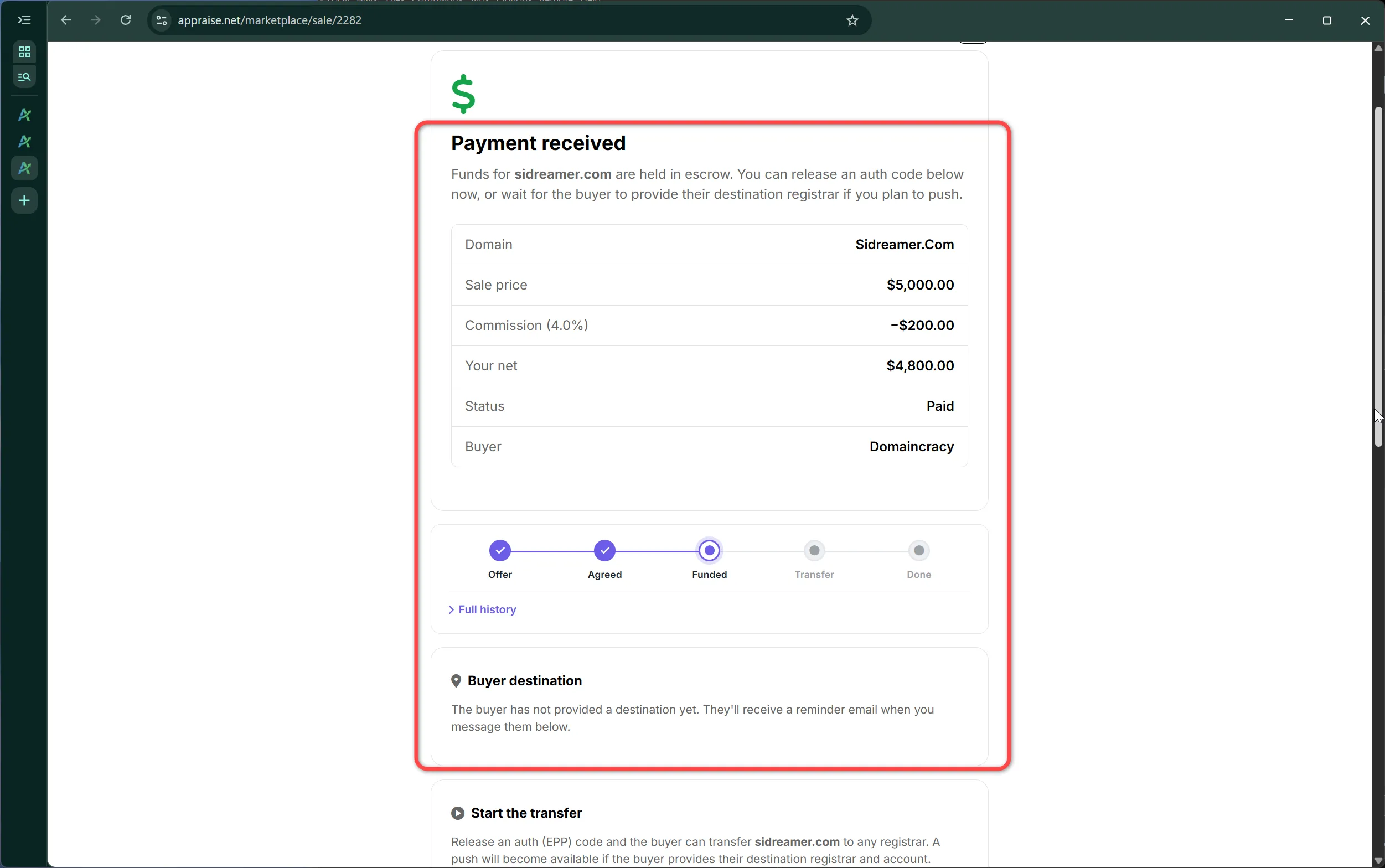
Before any money moves we re-check that you still control the domain (chapter 3). Once the buyer has paid, the listing is marked under contract so nobody else can buy it, we take a record of the domain's public registration data as evidence for both sides, and you receive an email with a link to the sale page. The buyer gets a page of their own where they tell you where to send the domain.
The seller's sale page after payment
Transferring the domain
You have two ways to deliver, and the buyer's page tells you which registrar and account they want it in:
Push. If the buyer has an account at the same registrar, push the domain to it from your registrar's control panel and mark it as started on the sale page. At GoDaddy the push needs the email address on the buyer's account (the customer number is optional), so buyers who pick GoDaddy are asked for that email and it is shown on your sale page.
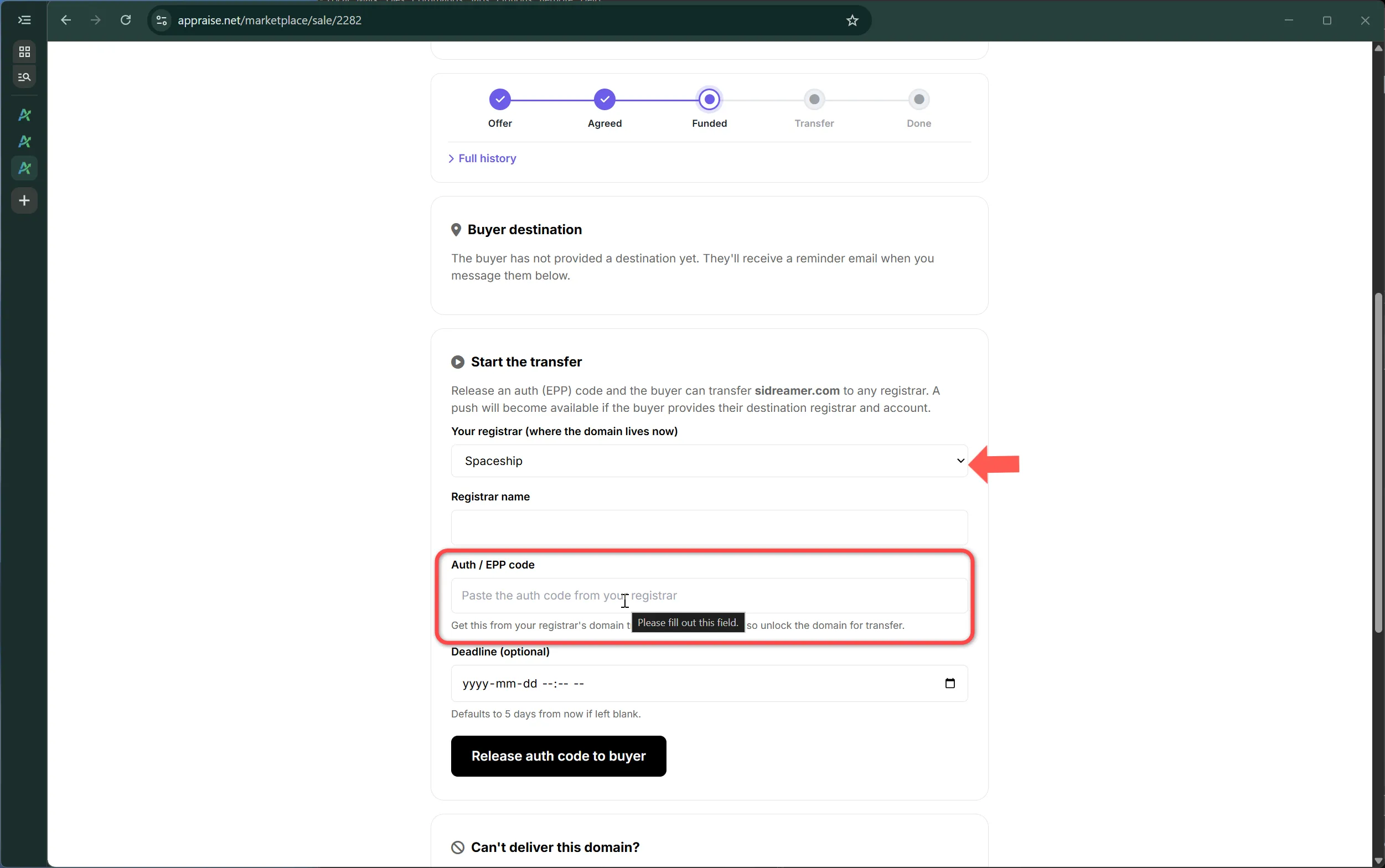
Transfer code. Unlock the domain, get its authorization code from your registrar, and submit it on the sale page. The buyer uses it to transfer the name to their registrar.
You have 5 days after payment to start one or the other. The buyer confirms receipt on their page, and your payout is issued the moment they do.
Submitting the transfer authorization code
The automatic steps
If you have not started the transfer 7 days after payment, the buyer is refunded automatically and the sale is recorded as failed on your seller profile.
If you have started it and the buyer goes silent, the sale completes and you are paid automatically 7 days after the transfer began.
The registration snapshot taken at payment, and again at release, is what we use if either side disputes what happened.
When a buyer makes an offer, a private deal thread opens between the two of you. Everything about that negotiation happens there: offers, counters, messages and the moment of acceptance.
Receiving an offer
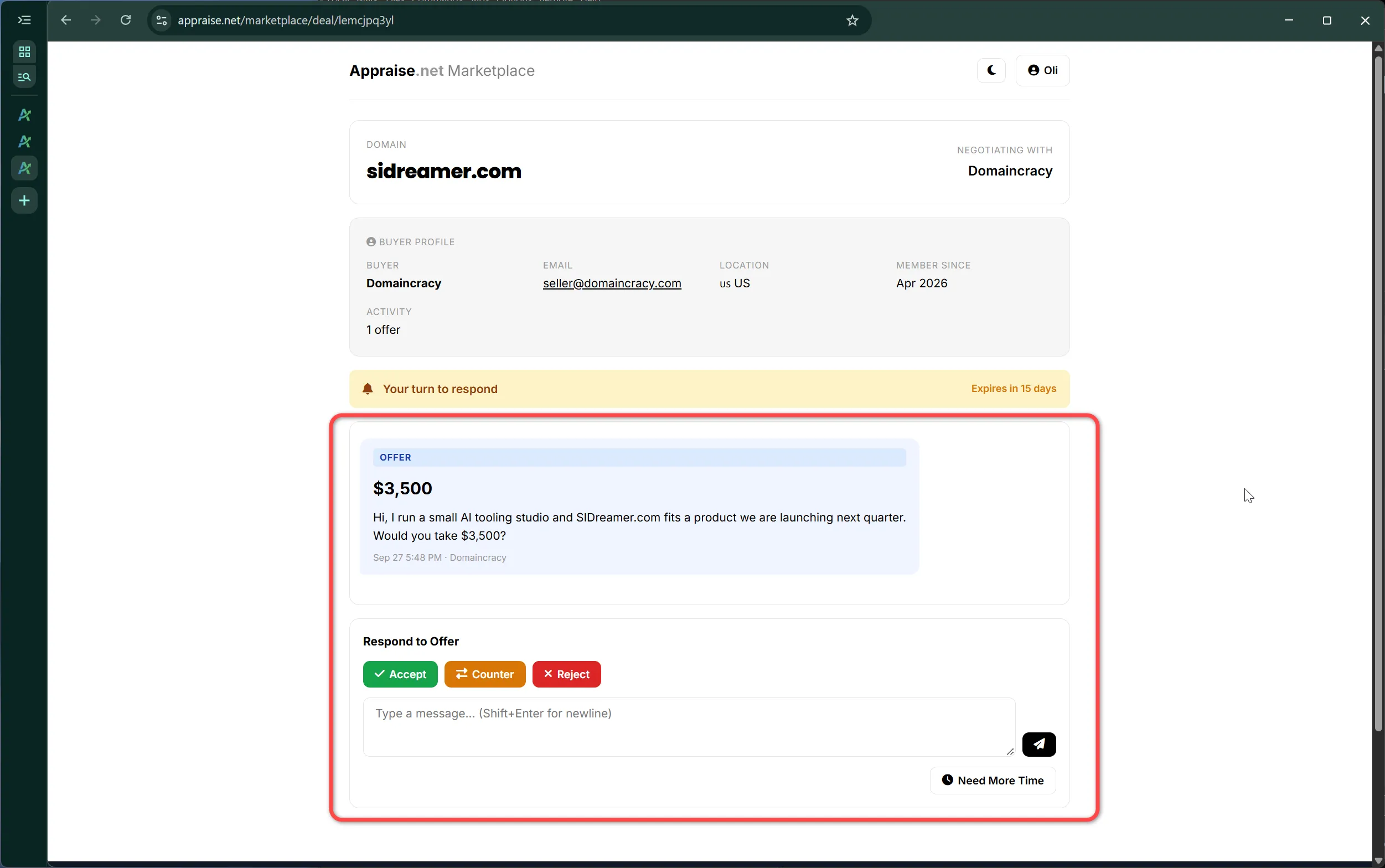
You are emailed, and the offer appears on your seller dashboard. Open the thread and you can accept, counter or decline, and write a message alongside any of them. Offers below your minimum never reach you.
An incoming offer in the deal thread
Countering
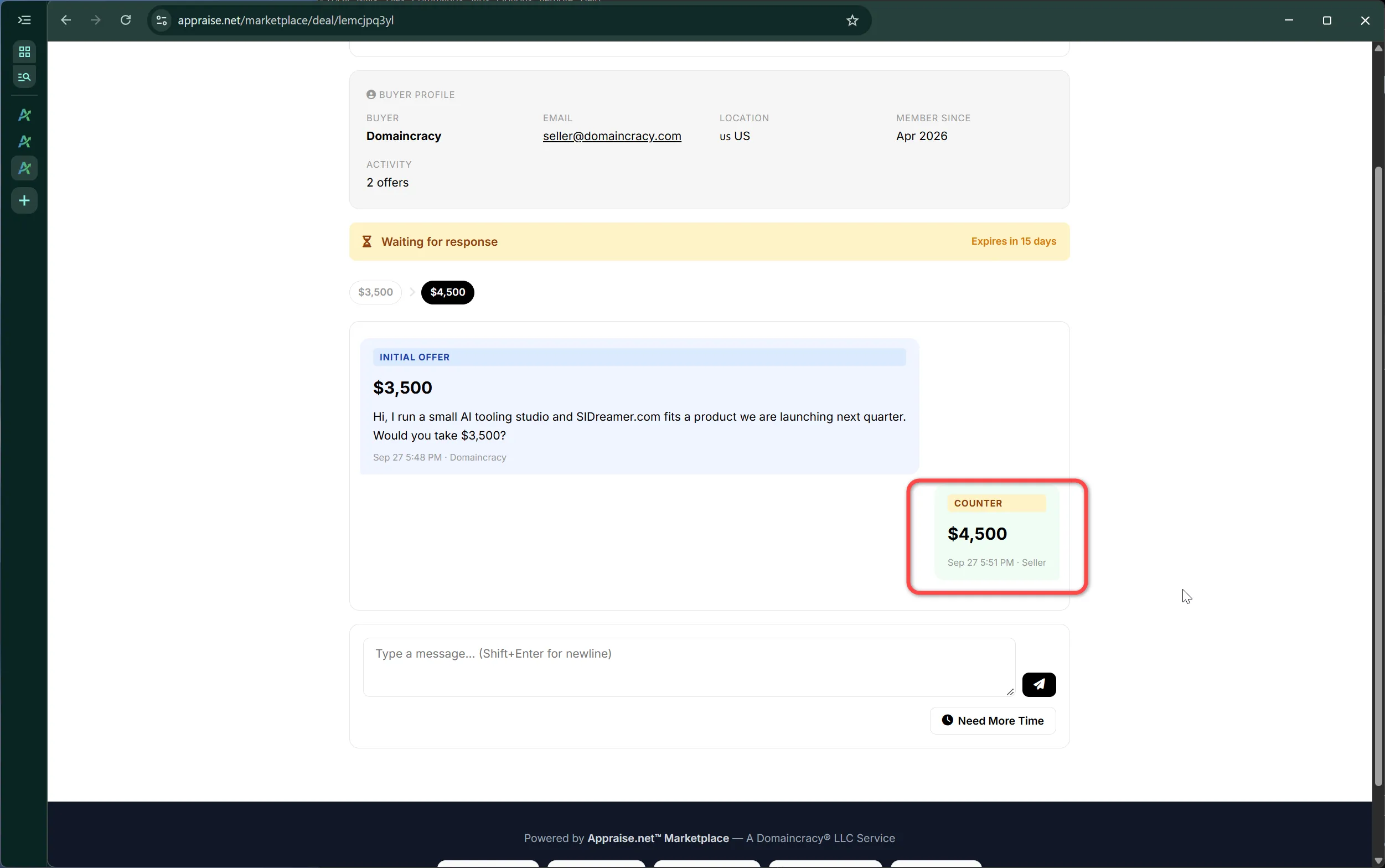
A counter carries your number and, if you want, a shorter or longer expiry between 3 and 30 days. The buyer can accept, counter back or walk away. There is no limit on rounds, and the thread keeps the whole history so neither side has to remember who said what.
A counter-offer with its expiry
Accepting
Accepting an offer creates the sale at that price and locks the listing. The buyer is sent to pay with any of the payment methods from chapter 8, and from the moment they pay, everything proceeds exactly like a Buy Now sale: the transfer choices, the 5-day window, the automatic steps. If the buyer never pays, the listing unlocks again.
Talking to the buyer
Use the thread's messages for anything that helps the sale: how the name is being used today, what is included, timing. Keep the transaction itself on the Marketplace; taking it off-platform loses the escrow, the ownership checks and the record we keep for both of you.
Lease-to-own lets a buyer take a name they cannot pay for outright and pay it off over months, while you keep ownership until the last installment. It is a contract: you accept the lease-to-own terms once when you first enable lease-to-own on a listing, and every buyer accepts them when they start a lease. This chapter is the seller's view of how it runs.
How the money flows
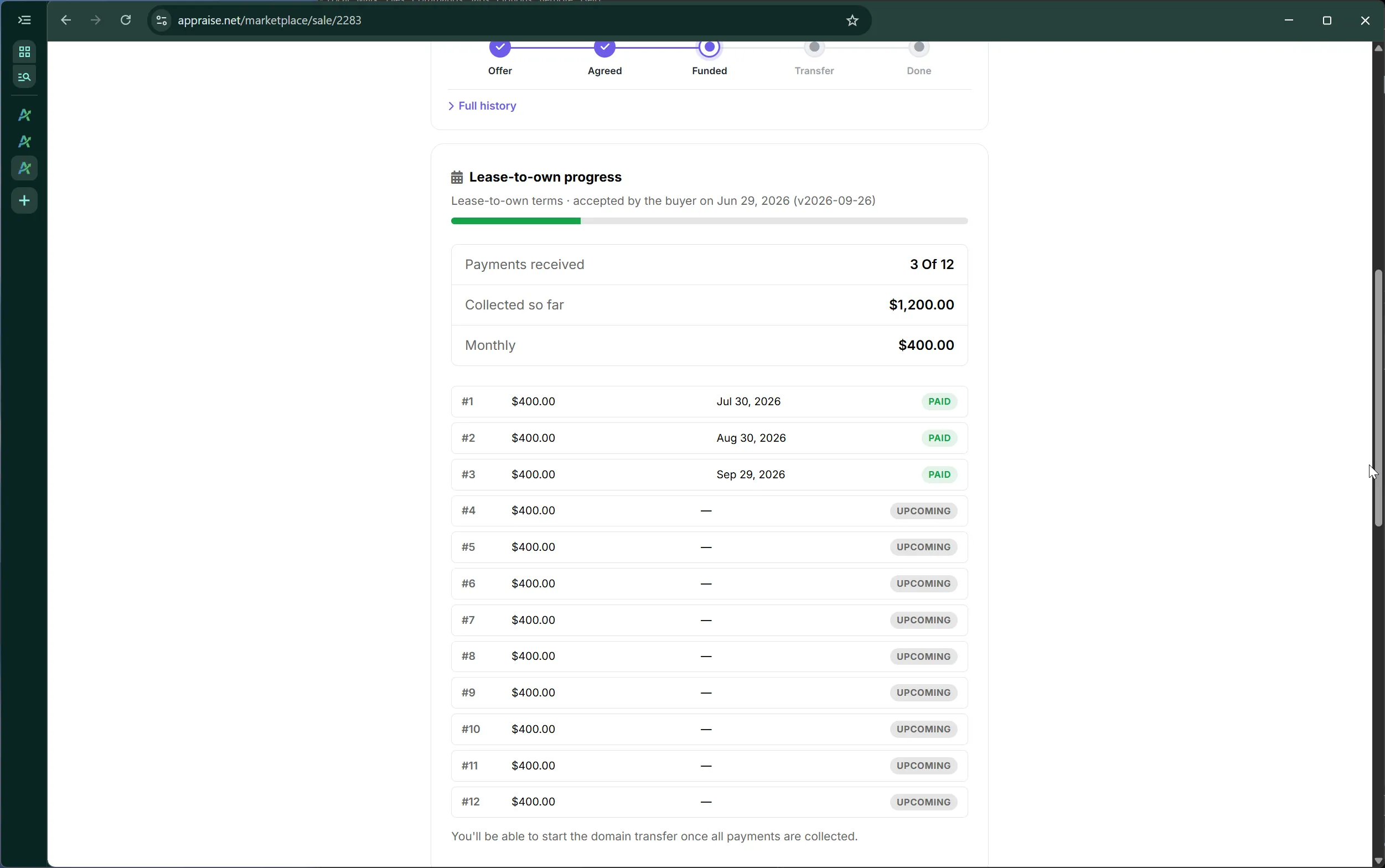
The buyer pays the down payment, if any, and then a fixed monthly amount by card for the term you set. They can change the card behind the lease at any time from their lease page. Each payment is paid out to you as it arrives, minus commission, so a lease is income from month one rather than a lump sum at the end.
A lease-to-own sale from the seller side
The domain during the lease
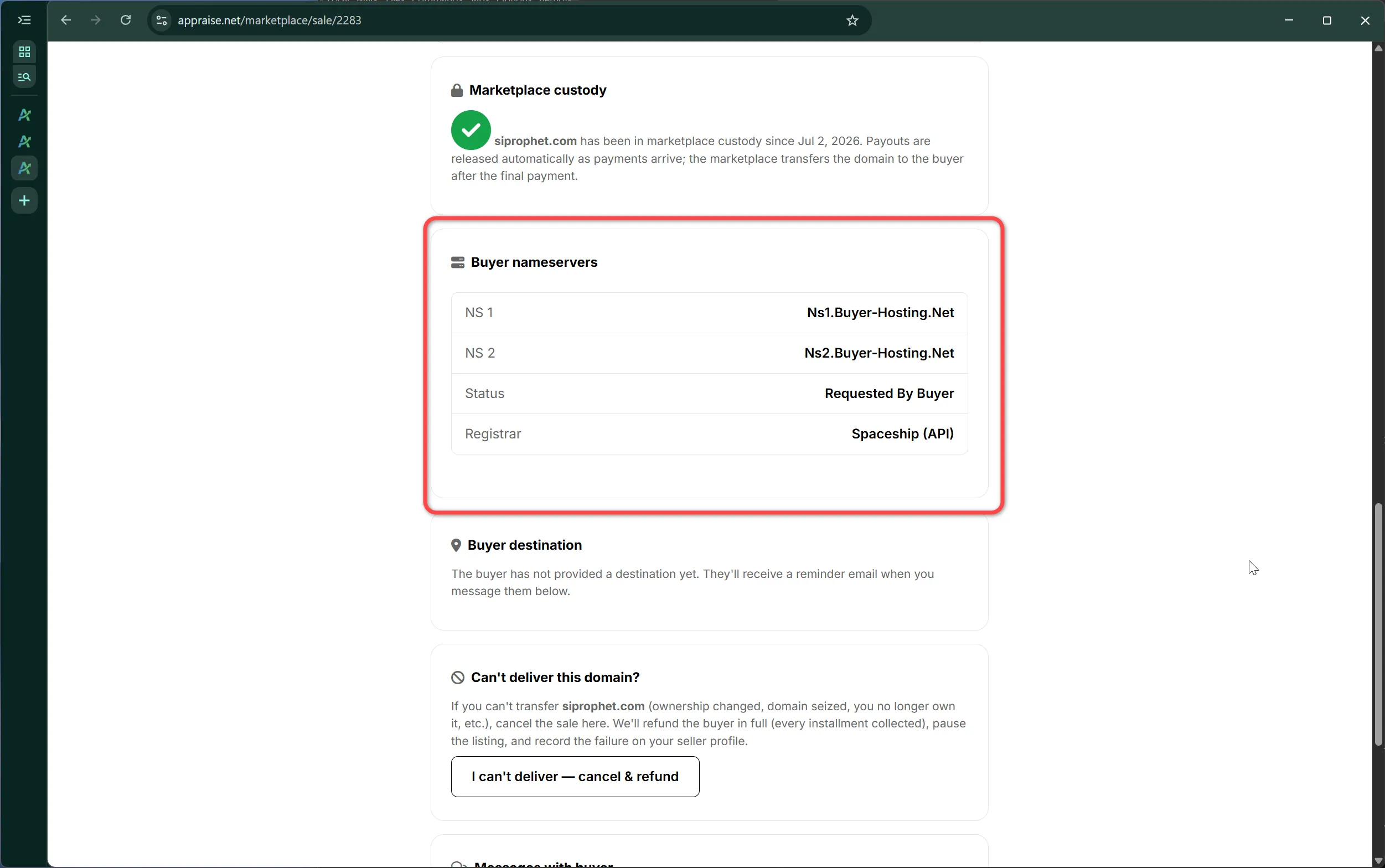
The name stays registered to you. The buyer, though, usually wants to start using it, and for that they may ask for their own nameservers. When they do, you get a request on the sale page with the exact nameservers to set at your registrar. Set them, mark the request done, and we verify the change. The buyer's site goes live on the name while you remain the registrant.
A buyer's nameserver request during a leaseThe same request from the buyer's side
A missed payment
Lease-to-own follows the market rule: a missed payment forfeits the lease. When an installment fails, the buyer is told immediately and has three weekdays to pay, by updating their card so the charge can be retried or by paying off the balance. You are told at the same time, with the deadline. From your sale page you can extend that deadline by up to 14 days if you would rather wait, or end the lease at once.
If the deadline passes unpaid, the lease ends automatically: future charges stop, the listing returns to active, and if the buyer's nameservers were live we restore the marketplace nameservers, through your registrar's API where we have one, otherwise with a note asking you to do it. Installments already paid are not refunded; the buyer was using the name for that time.
The seller's options after a missed paymentWhat the buyer sees during the grace period
Early payoff
At any point the buyer can pay the remaining balance in one payment from their lease page, by card or with Bitcoin. That ends the lease early: the remaining installments are marked paid, your share arrives as one payout, and the deal moves straight to the transfer step.
The end of the lease
When the final installment clears, or the buyer pays off the balance, the deal becomes a normal transfer: you push the domain or submit its transfer code within 5 days, the buyer confirms, and the lease is complete. If you sold through an account other than your own registrar, chapter 11 explains the custody step that happens first.
A lease means a buyer pays for months on a promise that the domain will be theirs at the end. To make that promise good for both sides, a domain on a lease-to-own deal is secured in a Marketplace-held account before the first payout is released to the seller.
Who this applies to
Every seller other than the Marketplace itself. If you are selling your own domains as an independent seller, a lease you accept triggers custody.
What custody means
You move the domain into an account we control at a registrar, and we hold it for the life of the lease. You remain the beneficial owner: if the buyer defaults, the name comes back to you; if the buyer completes the lease, we deliver the name to them. Renewals that fall due during the lease are handled with you so the name never lapses.
How to place a domain in custody
Push the domain into our account if your registrar is one of the trusted registrars where we hold an account. The sale page tells you the account to push to.
Transfer code otherwise: unlock the domain, submit its authorization code on the sale page, and we transfer it into our registrar. Transfers take a few days; payouts start once the name has arrived.
Timing and payouts
The buyer's down payment and installments are collected on schedule regardless, but your payouts are held until custody is confirmed. Once it is, every held installment is released together and later ones flow monthly as usual.
When the lease ends
On the final installment, or when the buyer pays off the balance early, we transfer the name to the buyer directly from custody; you have nothing further to do. If the lease is forfeited over a missed payment, the name is returned to the account you specify.
Chapter 12: Disputes, cancellations, refunds and delisting
Most sales never touch this chapter. It exists so that when something does go wrong you know what happens next and what it costs.
Cancelling a sale as the seller
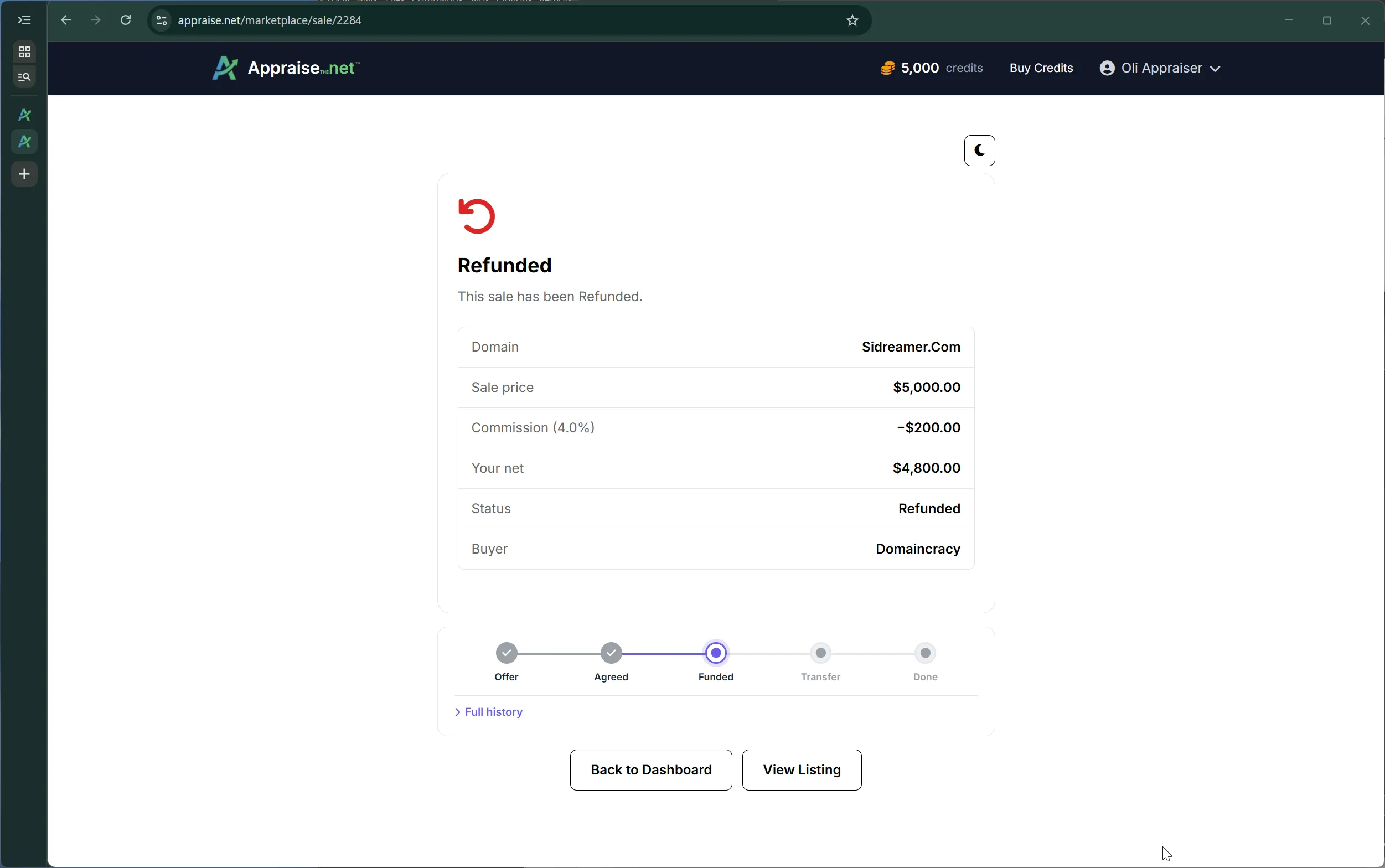
If you cannot deliver a domain after a buyer has paid, cancel the sale from the sale page and give a reason. The buyer is refunded in full, including any processing fee they paid, the listing is paused for you to review, and the cancellation is counted on your seller profile. Repeated failed sales reduce where your listings appear. Bitcoin payments are refunded by us to the buyer by hand within a business day.
Cancelling a sale from the seller sideThe sale after cancellation: refunded
Disputes
Either side can open a dispute from the sale page, for example if a transfer code does not work or a push never arrives. Opening one freezes the automatic steps and brings us in. We use the registration snapshots taken at payment and at release, the thread history and both registrars' records to resolve it, and the outcome is either completion with payout or a refund.
Refunds
Automatic when you never start the transfer within 7 days of payment, and on a seller cancellation. Refunds go back the way the buyer paid, to the card, bank account or PayPal account. There is no partial refund on a completed sale.
Ending a lease
A lease ends automatically when a missed payment is not made within its deadline, three weekdays unless you extended it. You can also end it yourself as soon as a payment is missed, the buyer can end it by stopping payment, or you can agree in the thread. Paid installments are never refunded; the domain returns to you or, from custody, to the account you name.
Delisting
Take a listing down from the seller dashboard at any time it is not under contract. On-platform listings disappear immediately. If the domain was pointed at our nameservers, point it back to your own; the sale page stops serving once the change propagates and the certificate is simply allowed to expire.
If a domain lapses
A listing whose domain stops pointing at us is not removed, because sellers move DNS for many reasons. It is marked as needing attention on your dashboard and the ownership re-check at purchase time protects buyers in the meantime. If the domain actually expires and is re-registered by someone else, the listing is retired.